This Self Storage Move-In Checklist is an Excel workbook for recording facility, unit, move-in date, monthly rent, assigned owner, due date, and completion details for each new rental.
The XLSX spreadsheet tracks six move-in steps, calculates overall status and days to due, and summarizes completion, upcoming deadlines, past-due items, scheduled monthly rent, and steps needing attention.
How this template can help
- Keeps up to 100 self-storage move-in checklists in one consistent tracking layout.
- Organizes unit condition, lock, gate access, payment, insurance choice, and orientation details by rental.
- Calculates overall status and days to due from the information entered for each checklist.
- Provides summary counts for completion, deadlines, scheduled monthly rent, and steps needing attention.
What the workbook contains
How to get started
1. Configure the assumptions
Open the Assumptions sheet and update the facility options, owner options, due-soon window, allowed date range, and monthly rent limits for the workflow.
2. Enter the move-in record
On the Move-In Checklist sheet, add a checklist ID, facility, unit, move-in date, monthly rent, assigned owner, checklist due date, and any useful notes in an available row.
3. Update each workflow step
Use the dropdowns to record the status of unit condition, lock or latch check, gate access review, payment setup, insurance choice, and tenant orientation.
4. Monitor calculated results
Leave the Overall Status and Days to Due formulas unchanged. Use those columns and the Summary sheet to identify completed records, open deadlines, and checklist steps that still need attention.
What the Self Storage Move-In Checklist Tracks
The workbook combines rental details and six move-in steps in each checklist row. Record the checklist ID, facility, unit, move-in date, monthly rent, assigned owner, and due date, then update unit condition, lock or latch check, gate access review, payment setup, insurance choice, and tenant orientation.
Overall Status and Days to Due are calculated columns. Notes provide space for operational context without changing the status calculation.
Worked Scenario: From Entry to Next Action
Input: A fictional facility enters a new record with a $189 monthly rent, an assigned owner, all required fields completed, and a due date exactly seven days from today. Four workflow steps are Complete, Payment Setup is In Progress, and Tenant Orientation is Not Started.
Result: The row calculates an Overall Status of In Progress and a Days to Due value of 7. With the default seven-day due-soon setting, the open record is included in the due-soon summary count, and its rent contributes $189 to scheduled monthly rent.
Interpretation: The required record details are present, but the move-in workflow is not complete because payment setup and orientation remain open.
Next decision: The assigned owner can prioritize those two steps before the due date and update their dropdown statuses when the work is completed.
Common Errors and Solutions
- If an active row is missing a checklist ID, facility, unit, move-in date, monthly rent, owner, or due date, the calculated status becomes Needs Review. Complete the missing required field.
- If any workflow-step cell is blank or marked Needs Review, update it with the applicable dropdown status after resolving the underlying entry.
- If Excel rejects a date or rent amount, check the limits on the Assumptions sheet. The default allowed dates are January 1, 2026 through December 31, 2027, and the default monthly rent range is $0 through $2,500.
- If a calculated cell was overwritten, restore the corresponding formula from an untouched row and confirm that its row references adjust correctly.
Operational Workbook Comparison: Excel vs. Paper Checklist
The Excel workbook is more suitable when an operation needs consistent digital statuses, calculated deadlines, and a combined summary. A paper checklist can remain suitable for a simple offline handoff when automatic calculations and consolidated reporting are not required.
| Operational factor | Self Storage Move-In Checklist Excel workbook | Paper checklist or printed form |
|---|---|---|
| Record organization | Stores up to 100 move-in records in one filtered worksheet. | Stores each record on a separate physical form unless details are re-entered elsewhere. |
| Status tracking | Uses dropdown values for six workflow steps and calculates an overall status. | Relies on handwritten marks and manual interpretation. |
| Deadline visibility | Calculates days to due and summarizes past-due and due-soon open records. | Requires staff to compare each written due date with the current date. |
| Input controls | Includes configured lists and validation limits for selected fields. | Accepts free-form entries without spreadsheet validation. |
| Notifications and integrations | Does not send notices or connect to facility systems. | Does not provide automated notices or system connections. |
Workbook Limits
This is a manual tracking tool. It does not send reminders, contact tenants, connect to facility systems, provision gate credentials, or process payments.
The Insurance Choice Recorded field documents the status of that workflow step; it does not choose coverage. Results depend on accurate entries, intact formulas, configured assumptions, and the spreadsheet application's current date. The checklist area supports 100 records.
How Status and Due-Date Calculations Work
An active row becomes Needs Review when required record fields are missing, a workflow-step cell is blank, or a step is marked Needs Review. It becomes Complete when all six steps are Complete or Not Applicable, and Not Started when all six are Not Started. Other valid mixed step combinations calculate as In Progress.
Days to Due is calculated from the checklist due date and the current date for an open record. It remains blank when the overall status is Complete or when the status or due date is unavailable.
Using the Summary for Daily Follow-Up
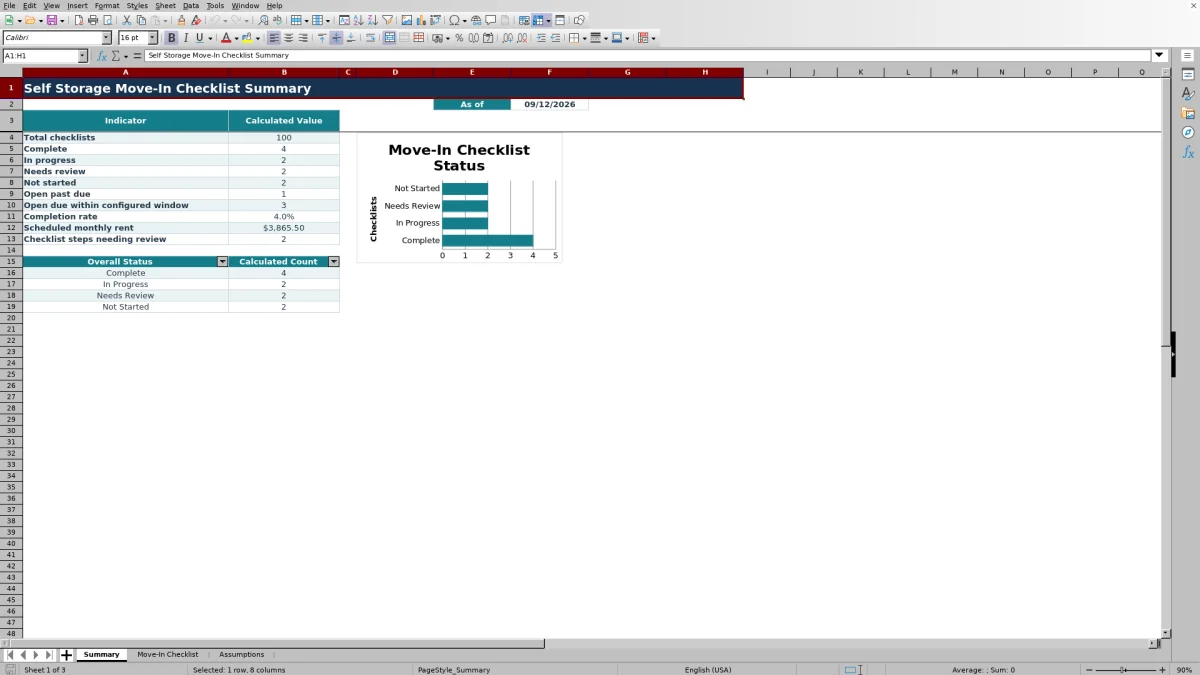
The Summary sheet reports total checklists, counts by overall status, open past-due records, open records due within the configured window, completion rate, scheduled monthly rent, and the number of individual steps marked Needs Review.
Filters on the checklist sheet can narrow the records by facility, owner, due date, step status, or overall status. The status chart provides a visual breakdown of Complete, In Progress, Needs Review, and Not Started records.
Frequently asked questions
What does the Self Storage Move-In Checklist Excel workbook track?
It tracks facility and unit details, move-in and due dates, monthly rent, assigned owner, unit condition, lock or latch check, gate access review, payment setup, insurance choice, tenant orientation, overall status, days to due, and notes.
How is Overall Status calculated?
The formula evaluates required record fields and all six workflow-step statuses. Missing required information, blank steps, or a Needs Review step can produce Needs Review. Complete, Not Started, and In Progress are calculated from the remaining status combinations.
Can the facility names, owners, and limits be changed?
Yes. The Assumptions sheet contains editable facility options, owner options, step status options, the due-soon window, the allowed date range, and minimum and maximum monthly rent settings.
Does the workbook send move-in reminders or gate codes?
No. The workbook displays deadline information for operational follow-up, but it does not send notices, transmit gate codes, or connect to facility systems.
How many move-in records can the workbook hold?
The Move-In Checklist sheet provides 100 prepared data rows, covering rows 5 through 104. Each row includes formulas for Overall Status and Days to Due.
About the editors

Casey MonroeFacility operations editor

Elliot ParkFinance and performance editor