This self storage lease renewal tracker is an Excel workbook for organizing fixed-term renewals across facilities and units. Facility owners, managers, regional operators, and acquisition teams can track lease end dates, current and proposed monthly amounts, renewal periods, record owners, statuses, notice timing, tenant response deadlines, documentation dates, and notes.
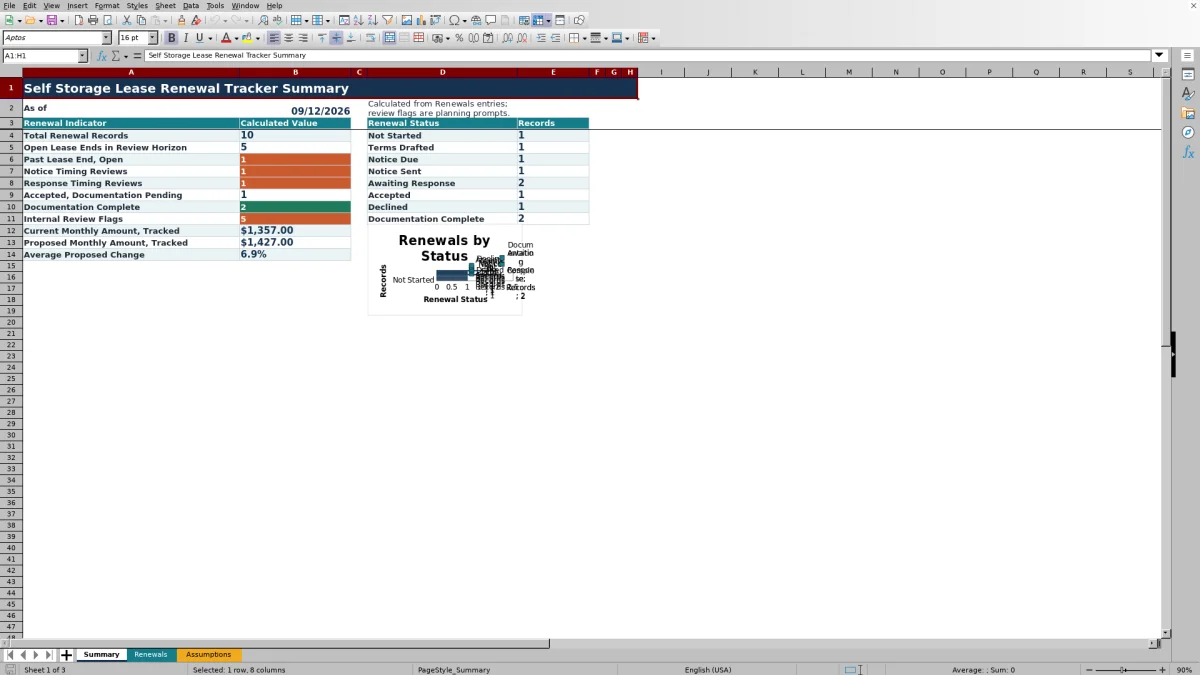
The workbook combines a 100-record renewal register with editable planning assumptions and a formula-driven summary. Calculated fields show notice and response due dates, proposed percentage changes, days to lease end, and review statuses, while the summary reports upcoming renewals, past-end open records, status counts, tracked amounts, and average proposed change.
How this template can help
- Keeps fixed-term renewal dates, proposed terms, notice timing, response deadlines, and completed documentation in one operating view.
- Surfaces upcoming, past-end, timing, and missing-information items through calculated indicators and review statuses.
- Shows renewal status counts, tracked monthly amount totals, and the average proposed change on a central summary.
- Standardizes entries with dropdown lists and validation for dates, amounts, renewal periods, statuses, owners, facilities, and notes.
What the workbook contains
How to get started
1. Configure the planning settings
Open the Assumptions sheet and confirm the notice lead days, response window, review horizon, internal change threshold, accepted date range, maximum monthly amount, and note-length setting. Update the available facility, record owner, renewal status, and renewal-period options as needed.
2. Enter each renewal record
Use the yellow entry cells on the Renewals sheet to add the facility, unit, lease end date, current and proposed monthly amounts, renewal period, owner, status, documentation date, and notes. The register provides space for 100 records.
3. Update progress and documentation
Move each record through the available renewal statuses as work progresses. When documentation is completed, enter the completion date so the calculated review status can recognize the record as complete.
4. Monitor deadlines and summary results
Use the calculated notice date, response date, days-to-end value, and review status to prioritize records. Filter the renewal register for focused follow-up, then use the Summary sheet to monitor open renewals, timing flags, status totals, tracked amounts, and the status chart.
Renewal Register and Status Control
The Renewals sheet supports 100 renewal records in rows 5 through 104. Each record can identify the facility, unit, lease end date, current and proposed monthly amounts, renewal period, record owner, renewal status, documentation completion date, and notes.
Status options cover Not Started, Terms Drafted, Notice Due, Notice Sent, Awaiting Response, Accepted, Declined, and Documentation Complete. Filters across the register help teams focus on a facility, owner, status, or deadline-related item.
Calculated Dates and Summary Indicators
The workbook produces calculated planning dates from the lease end date and editable assumptions. Notice Due Date subtracts the configured notice lead days from the lease end date, while Tenant Response Due Date adds the configured response window to the notice due date.
The Summary sheet reports total records, open leases ending within the review horizon, past lease ends that remain open, notice and response timing reviews, accepted records awaiting documentation, completed documentation, internal review flags, tracked monthly amounts, and average proposed change. Renewal status counts also feed the included chart.
Worked Scenario: From Proposed Terms to Next Action
Consider a fictional unit at Harbor Parcel Storage with a lease end date of October 31, 2026, a current monthly amount of $100, a proposed monthly amount of $110, a 12-month renewal period, and a Terms Drafted status.
Input: Using the default 45-day notice lead and 14-day response window, the record combines the lease date and proposed amounts with the planning assumptions. Result: The notice due date is September 16, 2026, the response due date is September 30, 2026, and the proposed change is 10.0%. Interpretation: The change is below the default 15% internal planning threshold, and the calculated dates establish the operating timeline. Next decision: Confirm the proposed terms and move the record toward Notice Due as September 16 approaches, updating the status after the notice step is completed.
Common Errors and Solutions
The formula-driven review flags help identify incomplete or time-sensitive records. Common issues and practical corrections include:
- A missing lease end date prevents deadline calculations. Enter a date within the configured planning range.
- A missing renewal status leaves the workflow unclear. Select one of the available status options.
- Documentation Complete without a completion date produces a missing-date flag. Enter the completed date in the documentation field.
- An elapsed lease end date can leave an open record flagged. Confirm the current status and record the next completed step.
- An amount outside the validated range is rejected. Enter a nonnegative amount within the configured maximum.
- A note that exceeds the configured text limit is rejected. Shorten the note or adjust the applicable assumption.
Comparison with a blank spreadsheet
Use the prepared workbook when its verified fields and calculations fit the facility task. Start with a blank spreadsheet when you need a different model and can build and test every field and formula.
| Method | Setup | Calculations and review | Practical fit |
|---|---|---|---|
| This Excel workbook | Use the prepared structure in the validated file | Review the documented calculations and results | Local editable workflow supported by the workbook |
| Blank spreadsheet | Create the structure from scratch | Build and test every formula and control | A different model designed for the facility |
Workbook Limits
The renewal register is prepared for 100 records, and its formulas, validation, filters, and summary references cover that defined range. Additional rows are not automatically included in those existing ranges.
The workbook uses editable assumptions rather than external lease files or rule sets. It does not send notices, deliver calendar alerts, collect tenant responses, or create official documentation. Dates and indicators are planning outputs based on entered data, configured settings, and the workbook's current date.
Operating Rhythm for Facility and Portfolio Teams
Facility managers can enter and update unit-level records, while regional operators can filter by facility, owner, or status. The Summary sheet provides a compact portfolio view for recurring renewal meetings, and the Assumptions sheet keeps timing settings and dropdown options consistent across the register.
A practical routine is to check upcoming and past-end indicators, filter records with timing or missing-information flags, update renewal statuses, enter documentation dates for completed records, and then confirm that the summary totals reflect the latest entries.
Frequently asked questions
How many self storage lease renewals can the workbook track?
The Renewals sheet is prepared for 100 records, covering rows 5 through 104. Its formulas, validation rules, filters, and summary calculations are configured for that range.
How are notice and tenant response due dates calculated?
The notice due date is calculated by subtracting the configured notice lead days from the lease end date. The tenant response due date is calculated by adding the configured response window to the notice due date.
Which renewal statuses are available?
The available statuses are Not Started, Terms Drafted, Notice Due, Notice Sent, Awaiting Response, Accepted, Declined, and Documentation Complete.
Does the Excel workbook send renewal notices or reminders?
No. The workbook calculates planning dates and organizes renewal records, but it does not send notices, deliver calendar reminders, collect responses, or create official documents.
Are the example facilities and records real?
No. The included facilities, units, owners, and example renewal records are fictional and are clearly identified as sample data. Replace them with the operating information needed for your facilities.
About the editors

Casey MonroeFacility operations editor

Elliot ParkFinance and performance editor