This self storage security deposit ledger is an Excel workbook for recording deposit activity by facility, unit, period, amount, deposit owner, status, due date, and notes. It gives facility owners and managers a consistent place to track receipts, recorded deductions, pending refunds, issued refunds, and closed or voided items.
The XLSX also provides status-level and facility-level summaries for regional operators and acquisition teams reviewing deposit records across multiple locations. Editable assumptions control facility labels, status wording, allowed dates, the maximum entry amount, and the threshold used to flag large amounts.
How this template can help
- Keeps deposit receipts, deductions, and refunds in one structured ledger.
- Shows recorded deposit activity by status and facility.
- Identifies overdue action rows and amounts above the review threshold.
- Supports consistent record review across individual facilities or regional portfolios.
What the workbook contains
How to get started
1. Configure the assumptions
Open the Assumptions sheet and update the facility labels, status wording, date limits, amount review threshold, and maximum ledger amount. Keep each status in its current semantic row because the Summary formulas assign a specific role to each row.
2. Enter deposit activity
Use rows 5 through 204 on the Ledger sheet. Enter one activity per row, select a facility and status, and complete the unit, period, positive amount, deposit owner, due date when applicable, and notes.
3. Maintain the current status
Use Deduction Under Review for an unresolved item, Deduction Recorded after it is documented, Refund Due for a pending refund, and Refund Issued after payment is confirmed. Use Closed / No Balance or Voided when those labels match the record.
4. Reconcile the summary
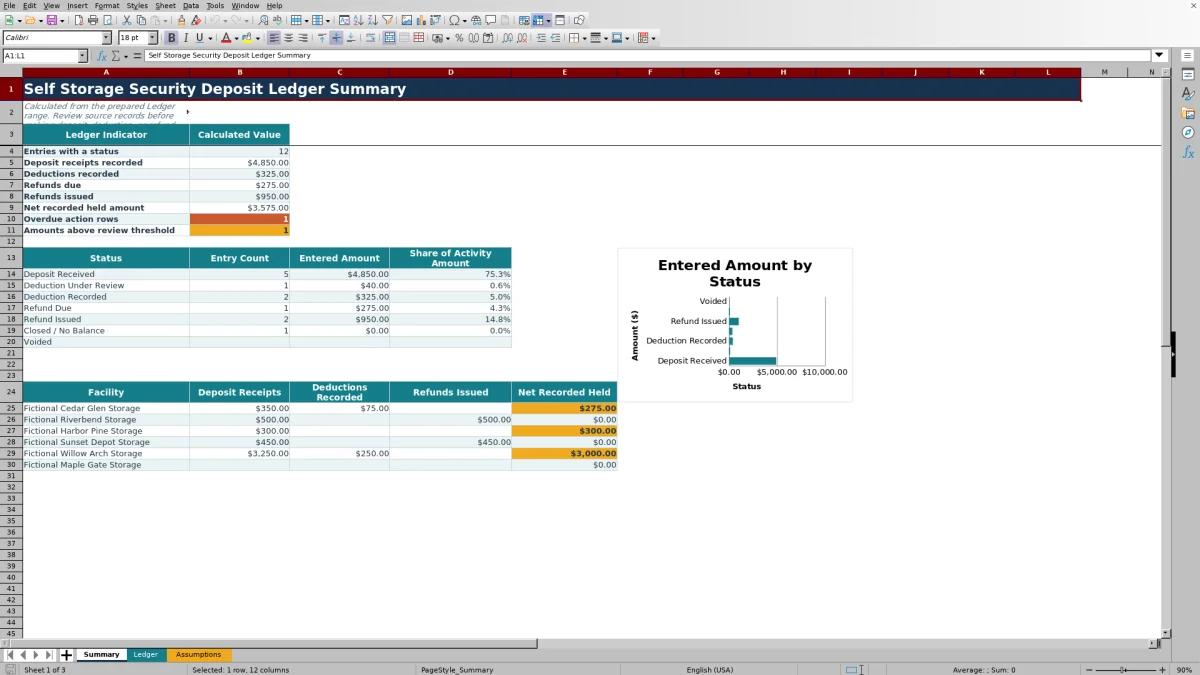
Review the calculated totals, overdue action rows, threshold flags, status activity, facility totals, and chart. Compare the results with lease files, receipts, deduction records, and refund confirmations before using the totals operationally.
Organizing Deposit Activity
The Ledger sheet uses one activity per row across a prepared range of 200 rows. Facility, unit, period, amount, deposit owner, status, due date, and notes remain together so staff can trace each summary amount back to its underlying entry.
Facility and status lists support consistent wording, while date and amount validation limit entries to the configured ranges. The Ledger can also be filtered by any of its eight operational columns.
How Statuses Affect Calculations
Status controls treatment in the Summary. Deposit Received contributes to receipt totals. Deduction Recorded reduces the net recorded held amount, while Deduction Under Review remains excluded from that calculation. Refund Due appears as a pending amount, and Refund Issued reduces the recorded held amount.
Closed / No Balance is informational for a zero-balance item. Voided entries are excluded from calculated activity totals. Because formulas depend on these semantic roles, status labels may be edited but should not be moved to different rows on the Assumptions sheet.
Worked Scenario for a Fictional Unit
Input: Fictional Cedar Glen Storage records a $350 Deposit Received for Demo-A101, a $75 Deduction Recorded, and a $275 Refund Due for Fictional Avery Lane.
Result: The Summary reports $350 in deposit receipts, $75 in recorded deductions, $275 in refunds due, and a $275 net recorded held amount for those entries.
Interpretation: The recorded deduction has reduced the held amount, while the pending refund remains identified separately until its status changes.
Next decision: Confirm the refund record and payment. Once issued, change the $275 entry from Refund Due to Refund Issued so the Summary reflects a recorded held amount of $0 for the scenario.
Errors and Solutions
Common entry fixes include the following:
- If a Period entry is rejected, use the first day of a month within the configured date range.
- If an amount is rejected, enter a positive value no greater than the maximum ledger amount.
- If totals appear in the wrong category, verify the selected status and confirm that assumption labels remain in their original semantic rows.
- If an overdue item is missing, confirm that the row uses Refund Due or Deduction Under Review and contains a valid past due date.
- If activity appears overstated, check for duplicate rows representing the same event.
Workbook Limits and Controls
Prepared limits include 200 ledger rows, six facility labels, seven status labels, a default date range from January 1, 2020 through December 31, 2035, and a default maximum ledger amount of $100,000. The default large-amount review threshold is $3,000.
These values can be edited on the Assumptions sheet, but the prepared formulas, validation, filter, and formatting end at row 204. The workbook records classifications and amounts; it does not verify source documents or establish whether a deduction is supported.
Comparison with a blank spreadsheet
Use the prepared workbook when its verified fields and calculations fit the facility task. Start with a blank spreadsheet when you need a different model and can build and test every field and formula.
| Method | Setup | Calculations and review | Practical fit |
|---|---|---|---|
| This Excel workbook | Use the prepared structure in the validated file | Review the documented calculations and results | Local editable workflow supported by the workbook |
| Blank spreadsheet | Create the structure from scratch | Build and test every formula and control | A different model designed for the facility |
Using the Summary for Multi-Facility Review
The Summary groups deposit receipts, recorded deductions, refunds issued, and net recorded held amounts by the six configured facility labels. It also shows entry count, entered amount, and share of activity amount for each status.
Facility managers can use these views for routine reconciliation, while regional operators and acquisition teams can apply the same status definitions across the supplied records. Any unusual total can be traced back to the filtered Ledger entries and supporting notes.
Frequently asked questions
What information does the self storage security deposit ledger track?
It tracks facility, unit, period, amount, deposit owner, status, due date, and notes for each deposit activity entry.
How many entries does the Excel workbook support?
The prepared Ledger range supports 200 activity rows, from row 5 through row 204. Formulas, validation, formatting, and the filter are configured for that range.
How does the workbook calculate the net recorded held amount?
The Summary starts with amounts classified as Deposit Received and subtracts amounts classified as Deduction Recorded and Refund Issued. Deduction Under Review and Refund Due are reported separately and do not reduce that calculated held amount.
Can facility names and status labels be customized?
Yes. The Assumptions sheet contains six editable facility labels and seven editable status labels. Keep each status in its existing row so its Summary treatment does not change.
How are overdue action rows identified?
The Summary counts entries marked Refund Due or Deduction Under Review when they have a valid due date earlier than the current date.
About the editors

Casey MonroeFacility operations editor

Elliot ParkFinance and performance editor