This self storage development budget Excel workbook organizes planned costs, forecasts, draws, owners, statuses, and due dates for a facility project. It supports key cost categories such as land, design, permits and fees, site work, structures, and security systems.
The XLSX file includes a detailed Budget sheet, a calculated Summary sheet, and editable assumptions for limits and dropdown lists. It is prepared for 100 budget lines and includes 10 fictional examples that facility owners, managers, regional operators, and acquisition teams can replace with project-specific inputs.
How this template can help
- Track budget, forecast, and drawn amounts across up to 100 prepared development cost lines.
- Review total costs, variances, draw rates, open items, due dates, and category or draw-period summaries.
- Standardize categories, units, draw periods, owners, and statuses with assumption-based dropdown lists.
- Surface missing inputs and cost exceptions through calculated review flags.
What the workbook contains
How to get started
1. Set the planning assumptions
Open the Assumptions sheet and update the large-line threshold, maximum amount, allowed due-date range, maximum quantity, categories, units, draw periods, owners, and statuses as needed.
2. Replace the fictional examples
Use the Budget sheet to replace or remove the 10 fictional sample lines. Enter the facility, category, cost item, quantity, unit, draw period, budget, forecast, drawn amount, owner, status, due date, and notes for each applicable cost.
3. Check calculations and flags
Review the calculated budget per unit, budget remaining, and review flag columns. Correct missing fields or investigate cases in which forecast exceeds budget or drawn amount exceeds forecast.
4. Monitor the summary
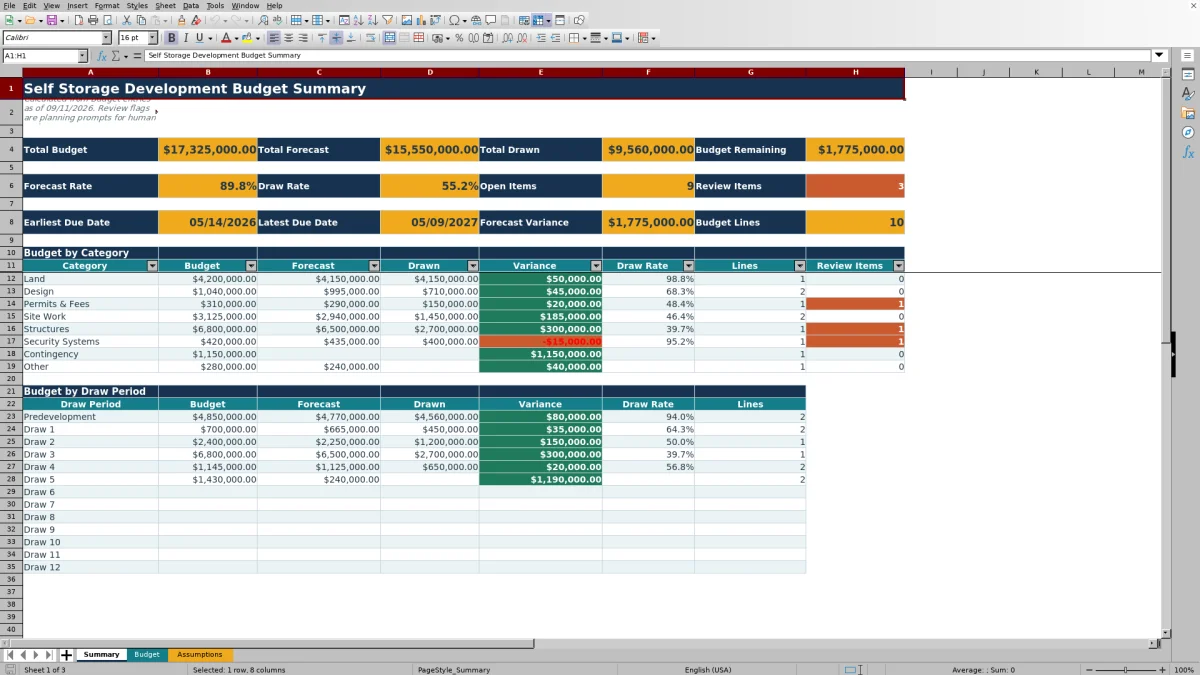
Use the Summary sheet to review overall totals, rates, open items, due dates, and breakdowns by budget category and draw period. Refresh Budget entries as estimates and draws change.
Organize self storage development costs
The Budget sheet provides 100 prepared budget lines for facility, category, cost item, quantity, unit, draw period, budget, forecast, drawn amount, owner, status, due date, and notes. Ten fictional examples demonstrate how costs such as land, design, permits and fees, site work, structures, and security systems can be organized.
Worked scenario for a fictional land allowance
Input: a fictional facility records a quantity of 1, a $4,200,000 budget, a $4,150,000 forecast, a $4,150,000 drawn amount, a Predevelopment draw period, and Complete status. Result: the workbook calculates $4,200,000 per unit and $50,000 remaining because budget remaining equals budget less forecast. Interpretation: the forecast is $50,000 below budget, while the drawn amount equals the current forecast. Next decision: the team can retain that variance for visibility or update the forecast if expected project cost changes.
Interpret the calculated results
The Budget per Unit calculation divides budget amount by quantity when both inputs are present. Budget remaining compares budget with forecast, while the Summary sheet separately reports total budget, total forecast, total drawn, forecast variance, draw rate, open items, review items, due-date range, and line count. Category and draw-period sections help teams locate where planned costs and draws are concentrated.
Common errors and solutions
- If a populated line shows Review: missing budget, enter the planned amount or clear the unused line.
- If the draw period or status is missing, choose an allowed value from its dropdown list.
- If forecast exceeds budget or drawn amount exceeds forecast, verify the entries and revise the applicable amount when project information supports a change.
- If Excel rejects a quantity, amount, or date, check the editable limits and allowed date range on the Assumptions sheet.
Workbook limits and appropriate use
This is a planning workbook prepared for 100 budget lines, not a transaction ledger or approval system. The included facility, owners, amounts, and examples are fictional. The workbook has no charts, Excel tables, or defined names, and its review flags are prompts based on entered values rather than approval or accounting conclusions.
Comparison with a blank spreadsheet
Use the prepared workbook when its verified fields and calculations fit the facility task. Start with a blank spreadsheet when you need a different model and can build and test every field and formula.
| Method | Setup | Calculations and review | Practical fit |
|---|---|---|---|
| This Excel workbook | Use the prepared structure in the validated file | Review the documented calculations and results | Local editable workflow supported by the workbook |
| Blank spreadsheet | Create the structure from scratch | Build and test every formula and control | A different model designed for the facility |
Maintain a consistent budget routine
Use the same update cadence for forecast amounts, drawn amounts, statuses, and due dates. After each update, scan the review flags and then use the Summary sheet to assess totals, variances, draw rates, category exposure, draw-period activity, and upcoming dates before deciding which budget lines need attention.
Frequently asked questions
What costs can this self storage development budget track?
The workbook can track line-item development costs using editable categories. Visible category examples include Land, Design, Permits & Fees, Site Work, Structures, and Security Systems.
How many budget lines are available?
The Budget sheet is prepared for 100 lines from rows 5 through 104. Ten fictional examples are included and can be replaced or removed.
How is budget remaining calculated?
Budget remaining equals the budget amount minus the forecast amount. Drawn amounts are tracked separately and appear in the Summary sheet totals and rates.
What can cause a review flag?
Documented flags include a missing budget, draw period, or status; a budget line above the editable large-line threshold; forecast above budget; and drawn amount above forecast.
Can the dropdown lists and entry limits be changed?
Yes. The Assumptions sheet contains editable category, unit, draw-period, owner, and status lists, along with limits for large lines, amounts, quantities, and due dates.
About the editors

Casey MonroeFacility operations editor

Elliot ParkFinance and performance editor