This self storage sales tax tracker is an Excel workbook for organizing facility revenue by reporting period, including unit rent, merchandise, administrative fees, and other fees.
The XLSX combines editable tax records with internal treatment selections, facility planning rates, calculated taxable amounts, estimated tax, due dates, owners, workflow statuses, and a summary of the entered data. Included records and facility names are fictional examples.
How this template can help
- Separates entered revenue, internally classified taxable amounts, and estimated tax by reporting period.
- Keeps facility, unit, revenue type, owner, status, due date, and notes together in each record.
- Uses dropdown lists and input validation to support consistent administrative entries.
- Provides summary totals and period-level figures without requiring a separate rollup worksheet.
What the workbook contains
How to get started
1. Set up facilities and planning rates
Open the Assumptions sheet and enter each facility with its planning rate in columns A and B. Update the available revenue types, tax treatments, statuses, and owners as needed within the prepared list ranges.
2. Enter revenue records
On Tax Records, complete the editable fields for facility, unit, reporting period, revenue type, amount, tax treatment, owner, status, due date, and notes. Enter reporting periods as the first day of the applicable month.
3. Check the calculated columns
The facility selection retrieves its planning rate. A taxable internal treatment places the entered amount in Taxable Amount, a not-taxable internal treatment returns zero, and Needs Review leaves the calculated amount blank. Estimated Tax multiplies the calculated taxable amount by the retrieved planning rate.
4. Monitor the summary
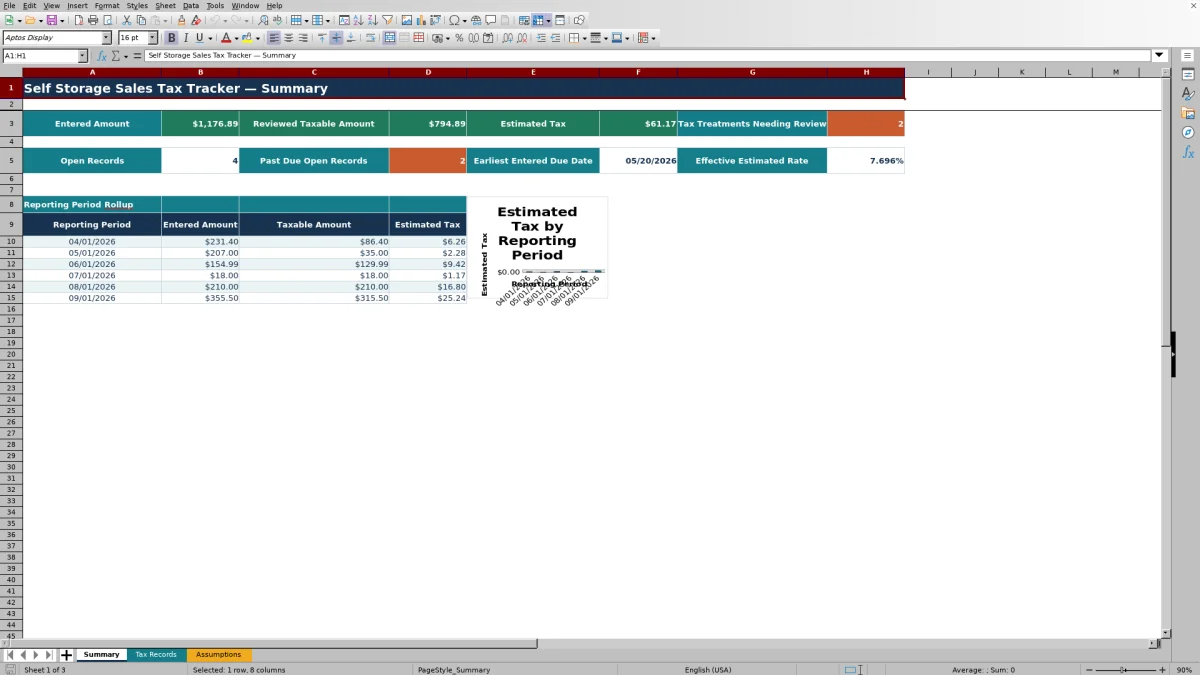
Use the Summary sheet to monitor entered amounts, reviewed taxable amounts, estimated tax, open records, past-due open records, the earliest entered due date, and the effective estimated rate. The period rollup and chart cover April through September 2026.
Organize Self Storage Revenue Records
The Tax Records sheet provides a record-level structure for facility activity. Each row can identify the facility, unit, reporting period, revenue type, amount, internal tax treatment, owner, status, due date, and supporting notes.
Revenue types supplied in the workbook include Unit Rent, Merchandise, Admin Fee, Other Fee, and an additional fee category. Keeping these entries in separate rows allows the Summary sheet to aggregate amounts without combining the underlying operational details.
Worked Scenario for a Fictional Facility
Input: A fictional Blue Quail Self Storage record uses a May 1, 2026 reporting period, Admin Fee as the revenue type, an amount of $35.00, Taxable - Internal Review as the treatment, and the facility planning rate of 6.500%.
Result: The formula places $35.00 in Taxable Amount and calculates $2.275 in estimated tax, which displays as $2.28 under the workbook's currency format.
Interpretation: The result reflects the selected internal treatment and the planning rate stored for that facility. It does not independently determine how the charge should be classified.
Next decision: The manager can compare the entry with its source records, confirm the reporting period and due date, and then update the workflow status for the next administrative step.
Reporting Period and Summary Controls
Reporting-period entries must be valid dates on the first day of a month and fall between January 1, 2021 and December 31, 2031. The prepared Summary rollup specifically lists April through September 2026.
Headline summary formulas total entered amounts, taxable amounts, and estimated tax across all 150 prepared record rows. Additional indicators count open and past-due open records, identify the earliest entered due date, and calculate the effective estimated rate from the recorded values.
Common Errors and Solutions
Common fixes: Use the prepared lists and date formats before troubleshooting calculated cells.
- If the planning rate is blank, confirm that the selected facility appears in the Assumptions facility list and has a rate in the adjacent cell.
- If Taxable Amount and Estimated Tax are blank, confirm that Amount and Tax Treatment are completed. Needs Review intentionally leaves those calculated fields blank.
- If a reporting period is rejected, enter a date on the first day of the month within the workbook's allowed date range.
- If a due date is rejected, use a valid date from 2021 through 2031.
- If a calculation disappears after editing, check whether the formula in columns G, H, or I was overwritten.
Workbook Limits to Consider
The prepared calculation and summary ranges end at row 153, providing 150 tax-record rows. The facility lookup range and facility dropdown use rows 4 through 103 on the Assumptions sheet.
The workbook applies one planning rate per listed facility and bases calculated taxable amounts on the selected internal treatment. Its Summary period table is fixed to six months in 2026, and the workbook does not supply jurisdiction-specific classifications, filing forms, payment processing, or automatic updates to rates and rules.
Operational Workbook Comparison
| Area | Self storage sales tax tracker | Generic blank spreadsheet |
|---|---|---|
| Initial structure | Includes prepared record fields, assumption lists, formulas, and summary metrics. | Requires the operator to design fields, lists, calculations, and reporting areas. |
| Calculation method | Retrieves a facility planning rate and calculates amounts from the selected internal treatment. | Uses calculations created by the operator, if any. |
| Entry controls | Includes dropdown lists plus decimal, reporting-period, and due-date validation. | Has no controls unless the operator adds them. |
| Reporting | Provides headline metrics, a six-period rollup, and an estimated-tax chart. | Requires custom summaries or manual aggregation. |
| Customization | Uses prepared ranges and fixed summary periods that must be extended when the operation exceeds them. | Starts without fixed ranges but also without an operating framework. |
This workbook is more suitable when a team wants a predefined administrative process for up to 150 records. A generic blank spreadsheet may be more suitable when the operator needs a fully custom data model and is prepared to build and maintain its controls and formulas.
Use Status and Due Dates for Administrative Follow-Up
Each record can be assigned to an owner and marked Draft, Needs Review, Ready for Review, or Closed. Due dates support follow-up, while the Summary identifies open records with dates earlier than the current day.
Notes can document the purpose or source of an entry. Together, these fields help facility managers, regional operators, and acquisition teams distinguish unresolved records from completed administrative work.
Frequently asked questions
What does the self storage sales tax tracker calculate?
It retrieves the planning rate assigned to a selected facility, calculates a taxable amount from the chosen internal treatment, and multiplies that amount by the planning rate to produce estimated tax.
Does the workbook determine which self storage charges are taxable?
No. The workbook applies the internal treatment selected for each record. It does not independently determine the classification of rent, merchandise, administrative fees, or other fees.
What happens when Needs Review is selected as the tax treatment?
The Taxable Amount and Estimated Tax cells remain blank for that record. The Summary also counts records with this treatment under Tax Treatments Needing Review.
Which reporting periods appear on the Summary sheet?
The prepared period rollup lists April 1 through September 1, 2026. Tax Records accepts first-of-month reporting dates from January 1, 2021 through December 31, 2031, but dates outside the six listed months are not included in that prepared period table.
How many records can the Excel tracker hold in its prepared range?
The Tax Records sheet includes 150 prepared data rows, from row 4 through row 153. Using additional rows requires extending the relevant formulas, validation rules, and summary references.
About the editors

Casey MonroeFacility operations editor

Elliot ParkFinance and performance editor