This self storage unit size change tracker is an Excel workbook for recording upgrade, downgrade, and no-size-change requests by facility, unit, original size, new size, reason, status, dates, rent, and assigned owner.
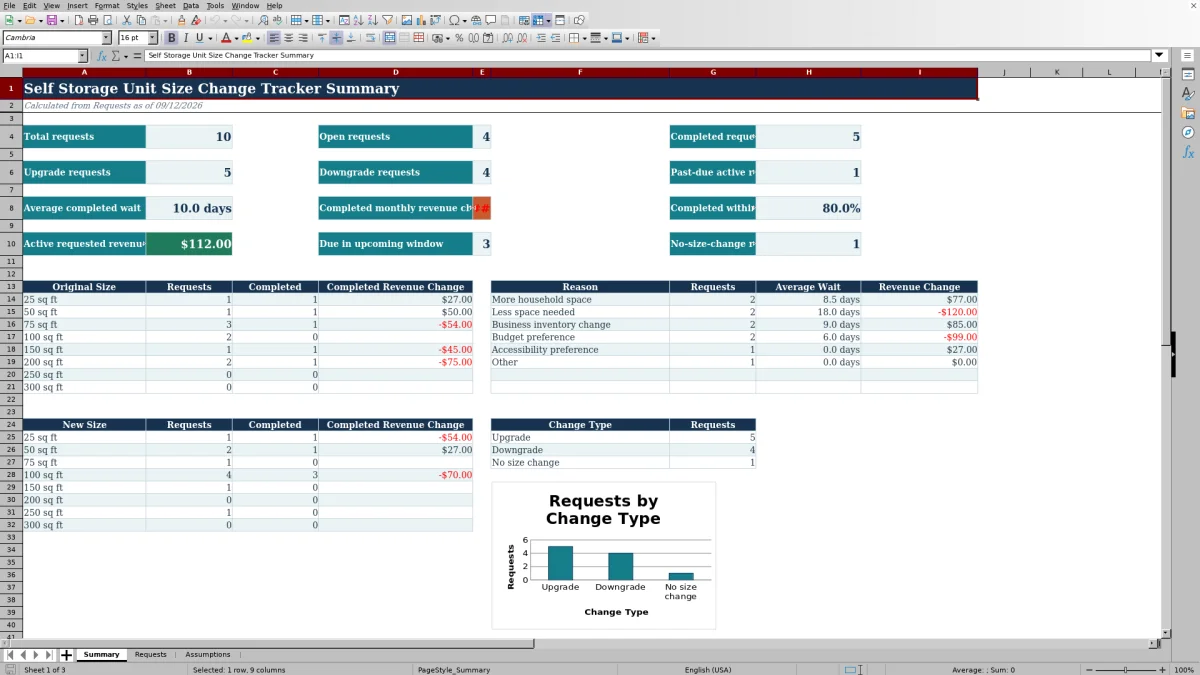
The spreadsheet calculates change type, wait days, and monthly revenue change while summarizing request volume, completion performance, upcoming due dates, and results by size and reason.
How this template can help
- Keeps unit size change requests, dates, status, ownership, and notes in one filterable register.
- Shows how completed and active requests affect monthly rent based on the entered original and new rates.
- Helps facility and regional managers monitor wait times, past-due requests, and upcoming due dates.
- Breaks down request activity by original size, new size, reason, and upgrade or downgrade type.
What the workbook contains
How to get started
1. Configure the assumptions
Open the Assumptions sheet and adjust the target wait time, revenue loss threshold, upcoming due window, and dropdown choices for facilities, statuses, reasons, owners, and unit sizes.
2. Enter each request
Add one request per row on the Requests sheet. Enter a unique request ID, facility, unit, request date, original and new sizes, monthly rents, reason, owner, status, relevant dates, and notes.
3. Update progress
Maintain the status, due date, and completed date as the request moves forward. Leave the formula-driven Period, Change Type, Monthly Revenue Change, Wait Days, and Review Warning columns intact.
4. Analyze the summary
Use the Summary sheet to monitor open, completed, past-due, and upcoming requests and to compare activity, wait time, and revenue change by size, reason, and change type.
Manage size change requests in one register
The Requests sheet provides a single request register for facility, unit, request date, original size, requested size, rent, reason, owner, status, due date, completed date, and notes. Filters make it practical for facility managers and regional operators to isolate open work by location, owner, status, or request type.
Calculate wait time and revenue change
The workbook uses calculated fields to classify each request as an Upgrade, Downgrade, or No size change. Monthly Revenue Change equals the new monthly rent minus the original monthly rent. Wait Days runs from the request date to the completed date or, for an active request, through the current date.
The Summary sheet separates completed monthly revenue change from the requested revenue change associated with records that are not Completed or Canceled.
Worked fictional request scenario
Input: A fictional request dated August 20, 2026 moves from 50 square feet at $79 per month to 100 square feet at $129 per month. It is completed on August 28 with an August 30 due date.
Result: The workbook classifies the request as an Upgrade, calculates an eight-day wait, and records a completed monthly revenue change of $50.
Interpretation: The request finished within the configured 14-day target and increased the recorded monthly rent for that completed move.
Next decision: The operator can examine the original-size, new-size, and reason summaries to determine whether similar 50-to-100-square-foot requests are recurring before adjusting availability plans.
Errors and solutions
A duplicate Request ID does not satisfy the uniqueness validation rule; assign a distinct internal ID. If a due date precedes the request date, or a completed date falls before the request date or after the current date, correct the date entry.
A Missing details warning indicates that one or more required tracking fields are blank. A No size change warning indicates that the original and new sizes match. Past-due warnings identify active requests whose due dates have passed, while the revenue-loss threshold can flag qualifying negative rent changes.
Comparison with a blank spreadsheet
Use the prepared workbook when its verified fields and calculations fit the facility task. Start with a blank spreadsheet when you need a different model and can build and test every field and formula.
| Method | Setup | Calculations and review | Practical fit |
|---|---|---|---|
| This Excel workbook | Use the prepared structure in the validated file | Review the documented calculations and results | Local editable workflow supported by the workbook |
| Blank spreadsheet | Create the structure from scratch | Build and test every formula and control | A different model designed for the facility |
Workbook limits
The prepared request area covers rows 4 through 123, for 120 request rows. Adding more records requires extending the formulas, validation, table range, and fixed Summary ranges. Metrics using the current date change when Excel recalculates the workbook.
The tracker measures entered monthly rent differences and request timing. It does not model occupancy, unit availability, transfer costs, or broader financial performance.
Use the summary for operating decisions
Facility owners and managers can use the dashboard to see total, open, completed, past-due, and upcoming requests. The size and reason sections help show where change requests are concentrated, while completed wait time and target completion percentage provide a consistent service-timing view.
The change-type chart compares Upgrade, Downgrade, and No size change counts. Operators can then filter the Requests sheet to inspect the records behind a summary pattern before changing follow-up priorities or unit availability plans.
Frequently asked questions
What does the self storage unit size change tracker record?
It records the request ID, facility, unit, request date, original and new unit sizes, original and new monthly rent, reason, owner, status, due date, completed date, and notes. Formula columns add the period, change type, monthly revenue change, wait days, and warning text.
How does the Excel workbook identify an upgrade or downgrade?
It compares the entered unit sizes. A larger new size is an Upgrade, a smaller new size is a Downgrade, and an equal size is labeled No size change.
How is monthly revenue change calculated?
Monthly Revenue Change equals New Monthly Rent minus Original Monthly Rent. A positive result indicates an increase in entered monthly rent, while a negative result indicates a decrease.
How are wait days calculated for open and completed requests?
For a request with a completed date, Wait Days runs from the request date to the completed date. For an active request without a completed date, it runs from the request date through the current date. Completed, canceled, or blank-status records without a completed date return no ongoing wait value.
Can the thresholds and dropdown lists be changed?
Yes. The Assumptions sheet contains editable values for the target wait time, revenue loss threshold, upcoming due window, and the facility, status, reason, owner, and size lists used by the Requests sheet.
About the editors

Casey MonroeFacility operations editor

Elliot ParkFinance and performance editor