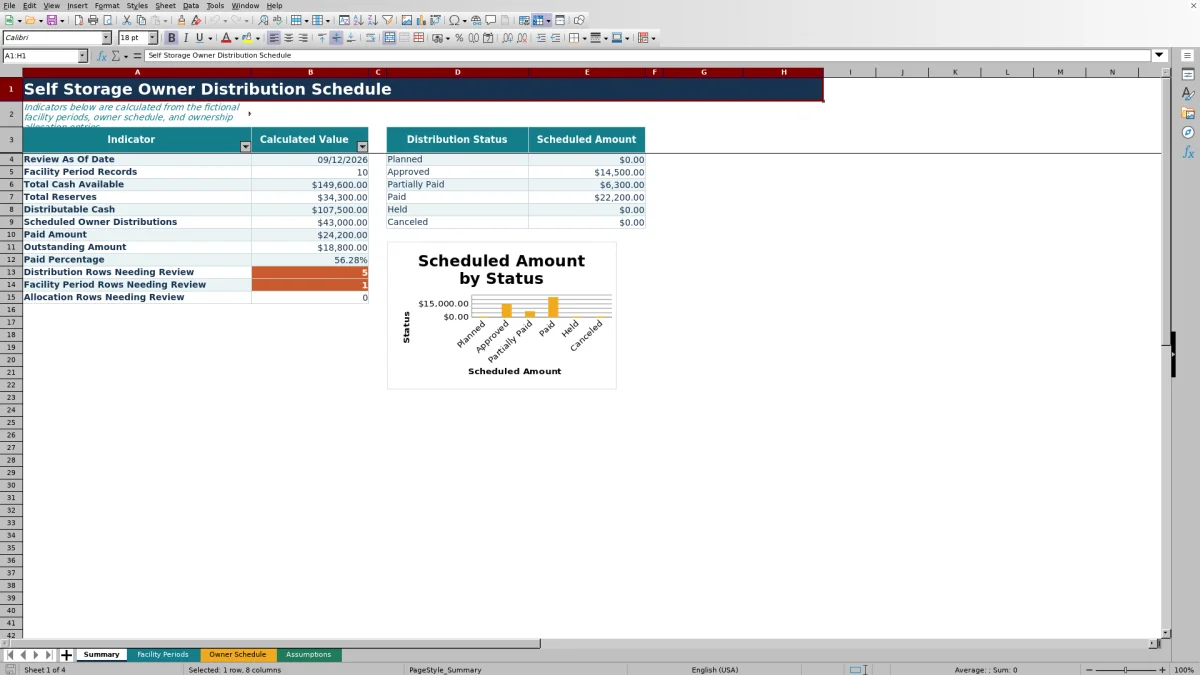
This self storage owner distribution schedule is an Excel workbook for organizing facility cash, reserves, distributable cash, ownership percentages, scheduled owner amounts, and payments by period.
The XLSX links facility-period records with active ownership allocations, then summarizes distribution statuses, paid and outstanding amounts, payment progress, and rows with review messages. Fictional sample data demonstrates the intended workflow.
How this template can help
- Keep facility cash, reserves, owner allocations, scheduled distributions, and payments in one workbook.
- Apply active ownership percentages consistently to each matching facility period.
- See scheduled, paid, and outstanding amounts alongside distribution status totals.
- Find missing information, duplicate records, allocation issues, and payment differences through review messages.
What the workbook contains
How to get started
1. Set the control values
Open Assumptions and enter the review as-of date, upcoming due window, payment variance tolerance, and ownership total tolerance.
2. Maintain ownership allocations
Enter each facility and owner combination, the ownership percentage, Active or Inactive status, and optional notes. Confirm that active percentages for each facility total 100% within the selected tolerance.
3. Enter facility periods
Add one row for each facility and period in Facility Periods. Enter cash available, the reserve amount, status, and notes, then check the calculated distributable cash and any review message.
4. Create owner schedule rows
In Owner Schedule, enter the facility, period, owner, distribution status, due date, paid amount, and notes. The workbook retrieves the active ownership percentage and calculates the scheduled amount.
5. Monitor totals and exceptions
Use Summary to check cash, reserves, scheduled distributions, payments, outstanding amounts, status totals, and exception counts. Return to the applicable input row to correct any unresolved message.
What the Schedule Organizes
Each facility-period row records the facility, period, cash available, reserve amount, status, and notes. The workbook calculates the amount remaining for distribution and rolls the totals into Summary. These linked records provide consistent cash controls across multiple fictional facilities and reporting periods.
How Facility Cash Becomes an Owner Distribution
The Facility Periods formula subtracts reserves from cash available and prevents the result from falling below zero. A canceled facility period produces zero distributable cash.
Owner Schedule retrieves the matching active ownership percentage from Assumptions. It multiplies that percentage by the matching facility-period amount to calculate the owner's scheduled amount. A canceled owner distribution also produces a scheduled amount of zero.
Worked Self Storage Distribution Scenario
Consider the fictional Cedar Lantern Storage record. Enter $18,000 of cash available and a $3,000 reserve for September 2026. With the period marked Closed, the formula returns $15,000 of distributable cash.
Active ownership allocations of 60% and 40% produce scheduled amounts of $9,000 and $6,000. The worked result shows that the entire $15,000 is assigned when the active allocations total 100%.
If paid amounts of $9,000 and $6,000 are entered with Paid statuses, the recorded payments match the calculated schedule. The next decision is to confirm the source entries and use Summary to monitor the combined payment totals and outstanding amount.
Distribution Status and Payment Tracking
Owner Schedule supports Planned, Approved, Partially Paid, Paid, Held, and Canceled statuses. Each row can also record a due date, paid amount, and notes.
Summary totals scheduled amounts by status and displays scheduled distributions, paid amounts, outstanding amounts, and paid percentage. Its chart uses the same six status categories, allowing owners and operators to see how scheduled cash is currently classified.
Common Errors and Solutions
Correct the source record when a review message appears rather than overriding a calculated cell.
- For a duplicate facility period, correct the facility or period or remove the extra record.
- When reserves exceed available cash, verify both amounts; distributable cash remains at zero.
- If an owner allocation is not found, add or activate the matching facility-owner allocation in Assumptions.
- When active ownership does not total 100% within tolerance, correct the active percentages or statuses.
- If a Paid row differs from its scheduled amount beyond the payment tolerance, correct the paid amount or select the status that reflects the payment state.
Comparison with a blank spreadsheet
Use the prepared workbook when its verified fields and calculations fit the facility task. Start with a blank spreadsheet when you need a different model and can build and test every field and formula.
| Method | Setup | Calculations and review | Practical fit |
|---|---|---|---|
| This Excel workbook | Use the prepared structure in the validated file | Review the documented calculations and results | Local editable workflow supported by the workbook |
| Blank spreadsheet | Create the structure from scratch | Build and test every formula and control | A different model designed for the facility |
Workbook Limits and Operating Boundaries
The workbook provides 100 prepared rows for facility periods, 100 for owner distributions, and 100 for ownership allocations. Formulas, validation, conditional formatting, filters, and summary references are configured around those ranges.
Scheduled amounts require an exact facility and period match, while ownership percentages require a matching active facility-owner allocation. Status entries should use the provided lists. If additional rows are needed, extend the formulas, validation, formatting, and summary ranges consistently before using the expanded area.
Frequently asked questions
How does the Excel workbook calculate distributable cash?
For each complete facility-period record, the workbook subtracts the reserve amount from cash available and uses zero as the minimum result. If the facility period is Canceled, distributable cash is zero.
How is each owner's scheduled amount calculated?
The workbook retrieves the matching active ownership percentage from Assumptions and multiplies it by distributable cash for the same facility and period. If no active allocation or facility-period match exists, the calculated amount remains blank and the review column can identify the issue.
What information can I record for an owner distribution?
You can enter the facility, period, owner, paid amount, status, due date, and notes. Ownership percentage, scheduled amount, and the review message are calculated fields.
How many records does the template support in its prepared ranges?
The prepared ranges include 100 facility-period rows, 100 owner-distribution rows, and 100 ownership-allocation rows.
Which status options are included?
Facility periods use Draft, Approved, Held, Closed, or Canceled. Owner distributions use Planned, Approved, Partially Paid, Paid, Held, or Canceled. Ownership allocations use Active or Inactive.
About the editors

Casey MonroeFacility operations editor

Elliot ParkFinance and performance editor