This Excel workbook models the financial and occupancy effects of proposed rent increases for existing self storage tenants. Enter unit-level rent, increase, timing, churn, ownership, and status information to estimate full-retention and risk-adjusted outcomes.
Facility owners, managers, regional operators, and acquisition teams can use the spreadsheet to compare current revenue with modeled scenarios before making operational decisions. The included records are fictional examples, and the Rent Plan supports up to 100 unit scenarios.
How this template can help
- Estimate added monthly and scenario-period revenue from scheduled existing-tenant rent increases.
- Account for expected churn with a default assumption or optional unit-level overrides.
- Measure expected retained units and post-change occupancy within the modeled records.
- Identify incomplete inputs and scenarios that cross configurable review thresholds.
What the workbook contains
How to get started
1. Set the model assumptions
Open the Assumptions sheet and enter the scenario length, default expected churn, increase thresholds, monthly impact threshold, and minimum review lead days.
2. Enter unit scenarios
Use the editable Rent Plan fields to enter each facility, unit, square footage, effective period, current rent, proposed increase, owner, status, review due date, and notes. Add a churn override only when the unit should not use the default rate.
3. Resolve flagged records
Check the Review Flag column for missing inputs, invalid values, threshold exceptions, or short timing windows. Correct the applicable inputs before using the portfolio totals.
4. Interpret the summary
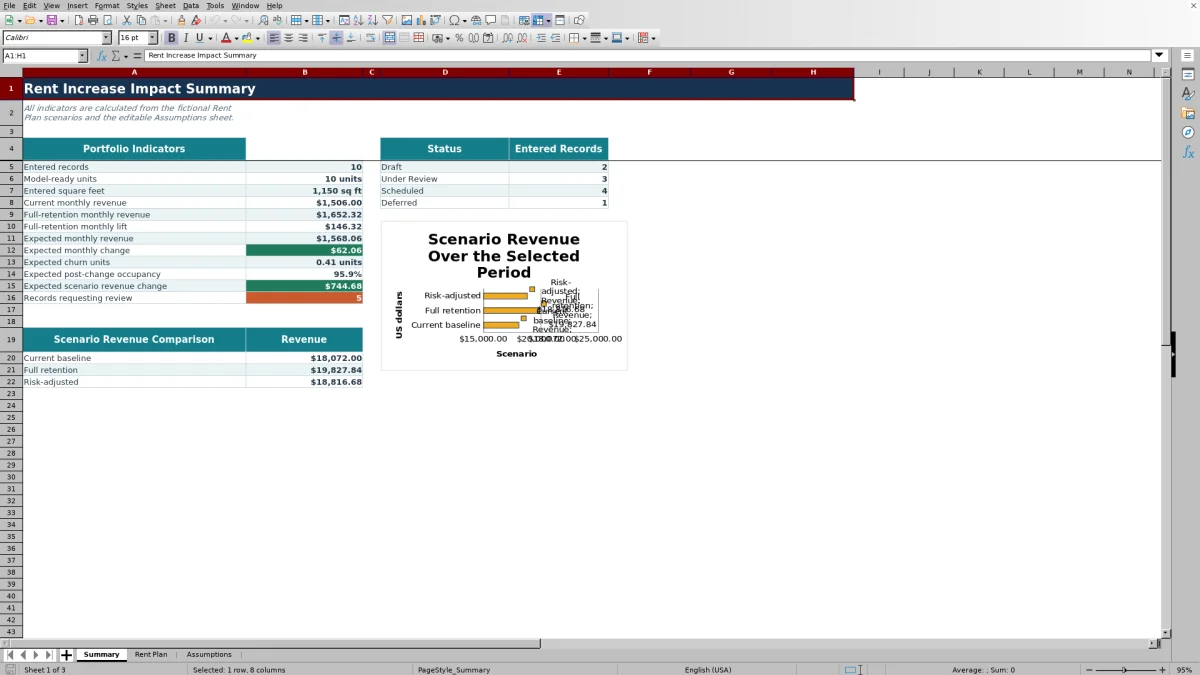
Use the Summary sheet to compare the current baseline, full-retention outcome, and risk-adjusted outcome. Review expected churn units, modeled occupancy, status counts, and scenario revenue change together.
Model Existing-Tenant Rent Increase Impact
The workbook organizes unit-level inputs for proposed existing-tenant rate changes. Each model-ready row combines current monthly rent, proposed increase, applicable churn, status, and scenario duration to estimate financial and retention effects.
Rows marked Deferred keep their current rent and assume full retention in the scenario. Other valid rows apply the proposed increase and either the row-level churn override or the default churn assumption.
Worked Fictional Scenario
Input: Assume a fictional 100-square-foot unit rents for $100 per month. The proposed increase is 10%, the status is Scheduled, the scenario runs for 12 months, and the 4% default churn rate applies.
Result: Scenario monthly rent is $110, full-retention monthly lift is $10, and expected retained units are 0.96. Expected monthly revenue is $105.60, producing an expected monthly change of $5.60. Baseline 12-month revenue is $1,200, full-retention revenue is $1,320, and risk-adjusted revenue is $1,267.20.
Interpretation: The modeled increase offsets the assumed churn and adds an expected $67.20 over 12 months, but the outcome remains dependent on the churn assumption. In this one-record example, expected post-change occupancy is 96% within the modeled population.
Next decision: Compare the expected gain, timing, and retention assumption with the facility's operating goals, then decide whether to keep the scenario scheduled, revise the inputs, or defer it.
How the Revenue and Occupancy Calculations Work
For an eligible record, scenario monthly rent equals current monthly rent multiplied by one plus the proposed increase. Expected monthly revenue equals scenario rent multiplied by expected retained units, while expected monthly change compares that result with current rent.
- Baseline scenario revenue equals current monthly rent multiplied by the selected scenario months.
- Full-retention revenue assumes the increased rent is collected without modeled churn.
- Risk-adjusted revenue adds the churn-adjusted scenario change to baseline revenue.
- Expected churn units equal model-ready units minus expected retained units.
- Expected post-change occupancy equals expected retained units divided by model-ready units.
Input Errors and Practical Solutions
Resolve flags before relying on totals. A flagged row can indicate missing required fields, invalid numeric inputs, a threshold exception, an unfavorable monthly impact, or insufficient lead time between the review due date and effective period.
- If required fields are blank, complete the facility, unit, square footage, dates, rent, increase, owner, and status entries.
- If rent, square footage, or percentage values are invalid, replace them with values inside the permitted validation range.
- If an increase falls outside the configured minimum or maximum, inspect the proposed percentage and adjust the scenario or threshold as appropriate.
- If expected monthly change falls below the warning threshold, examine the churn assumption and proposed increase together.
- If lead time is too short, verify the review due date, effective period, and minimum lead-day assumption.
Comparison with a blank spreadsheet
Use the prepared workbook when its verified fields and calculations fit the facility task. Start with a blank spreadsheet when you need a different model and can build and test every field and formula.
| Method | Setup | Calculations and review | Practical fit |
|---|---|---|---|
| This Excel workbook | Use the prepared structure in the validated file | Review the documented calculations and results | Local editable workflow supported by the workbook |
| Blank spreadsheet | Create the structure from scratch | Build and test every formula and control | A different model designed for the facility |
Model Limits and Interpretation Boundaries
Expected churn is an assumption, not a prediction of individual tenant behavior. Expected retained units can therefore appear as fractional values because they represent probability-weighted outcomes rather than physical partial units.
The occupancy indicator measures expected retention only within model-ready records. It does not represent total facility occupancy unless the entered rows are the entire occupied-unit population. The workbook supports 100 Rent Plan rows and a scenario horizon of 1 to 36 months, and it does not send notices or update tenant records.
Turn Results Into a Scenario Decision
Start with the Review Flag column, then use the Rent Plan filter to examine scenarios by facility, owner, status, effective period, or financial result. Compare full-retention lift with expected monthly change to see how much modeled churn reduces the proposed gain.
On the Summary sheet, read revenue, expected churn units, modeled occupancy, status counts, and flagged-record totals together. A positive portfolio result can still contain unit scenarios that warrant adjustment because of timing, assumptions, or threshold exceptions.
Frequently asked questions
What does the self storage rent increase impact model calculate?
It calculates scenario monthly rent, full-retention monthly lift, expected retained units, expected monthly revenue, expected monthly change, baseline scenario revenue, and expected scenario change for each model-ready unit.
What happens when the expected churn override is blank?
The row uses the default expected churn rate entered on the Assumptions sheet. Entering a valid override replaces the default for that specific unit scenario.
How does Deferred status affect a scenario?
A Deferred record keeps its current monthly rent instead of applying the proposed increase and uses one expected retained unit. It remains represented in the scenario without contributing an increase.
Does expected post-change occupancy equal the facility's actual occupancy?
Not necessarily. The metric divides expected retained units by model-ready units, so it describes expected retention within the entered scenarios. It represents total facility occupancy only if those records cover the full occupied-unit population.
Can the Excel workbook apply rent increases or send tenant notices?
No. The workbook estimates scenario effects only. It does not send notices, change tenant records, or execute scheduled rent increases.
About the editors

Casey MonroeFacility operations editor

Elliot ParkFinance and performance editor