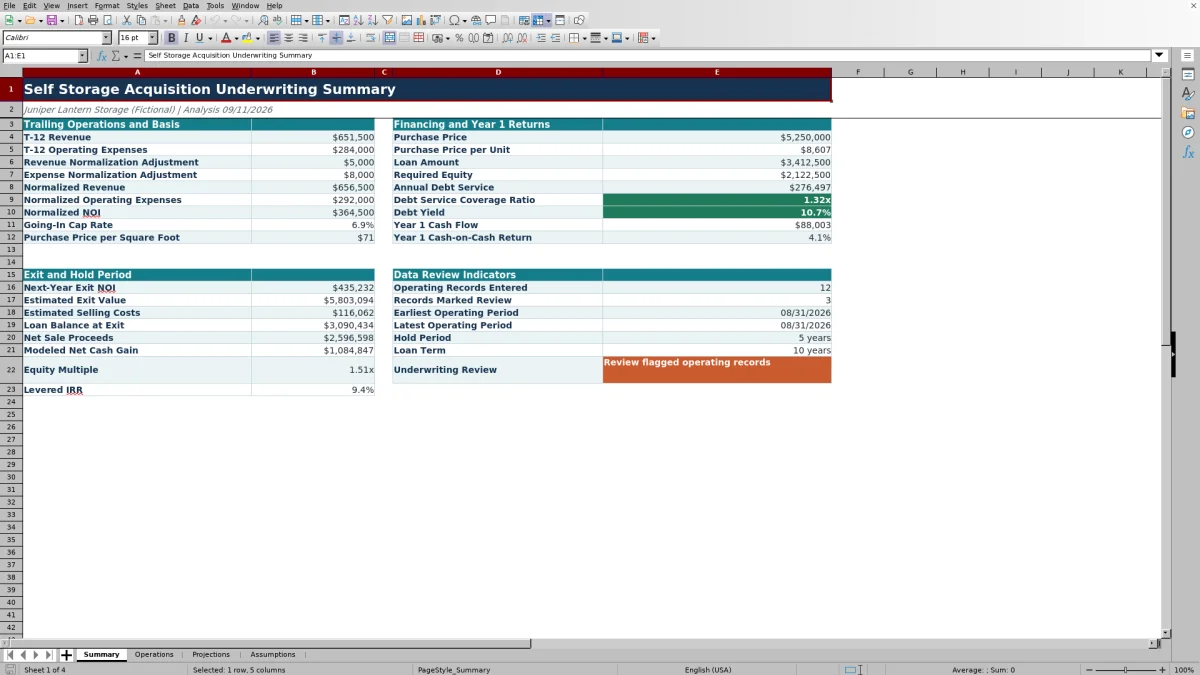
This self storage acquisition underwriting spreadsheet is an Excel workbook for combining trailing operations, normalization adjustments, acquisition costs, financing terms, annual projections, and exit assumptions in one model.
Facility owners, managers, regional operators, and acquisition teams can enter operating records and scenario assumptions, then use the calculated summary to evaluate normalized NOI, acquisition basis, debt coverage, cash flow, equity multiple, and levered IRR.
How this template can help
- Connects trailing operating results with acquisition pricing, debt terms, and exit assumptions.
- Separates editable assumptions and operating records from calculated projections and summary outputs.
- Flags estimated or unresolved operating records through status, owner, due-date, and notes fields.
- Shows operating performance, debt coverage, annual cash flow, and modeled exit returns in one acquisition scenario.
What the workbook contains
How to get started
1. Enter the acquisition assumptions
Open Assumptions and update the facility name, analysis date, rentable area, unit count, purchase price, closing costs, capital improvements, financing terms, hold period, growth rates, and exit assumptions.
2. Load the trailing operations
Enter revenue and operating-expense records in Operations. Assign each record a category, amount, owner, and status, and use the due-date and notes fields when follow-up is needed.
3. Check the annual projection
Use Projections to examine revenue, operating expenses, NOI, debt service, operating cash flow, loan balance, exit value, net sale proceeds, and total equity cash flow through the selected hold period.
4. Evaluate the summary metrics
Use Summary to assess normalized NOI, going-in cap rate, price per unit, price per square foot, required equity, DSCR, debt yield, cash-on-cash return, equity multiple, levered IRR, and operating-record indicators.
How the Acquisition Model Connects Operations and Returns
The workbook sums records categorized as Revenue or Operating Expense, applies the entered normalization adjustments, and calculates normalized NOI. It then combines the purchase price, closing costs, capital improvements, loan-to-value ratio, interest rate, and amortization term to estimate required equity and annual debt service.
Annual formulas project revenue and expenses separately, calculate NOI and operating cash flow, track the modeled loan balance, and add net sale proceeds in the selected exit year. The Summary consolidates these results into cap rate, DSCR, debt yield, cash-on-cash return, equity multiple, and levered IRR.
Worked Fictional Self-Storage Acquisition Scenario
Input: Assume fictional trailing revenue of $645,000, a $5,000 revenue adjustment, trailing operating expenses of $255,000, and a $5,000 expense adjustment. Use a $5.25 million purchase price, 2% closing costs, $180,000 of initial capital improvements, 65% loan-to-value financing, a 6.5% interest rate, and 25-year amortization.
Result: The model produces normalized revenue of $650,000, normalized operating expenses of $260,000, and normalized NOI of $390,000. The going-in cap rate is about 7.4%, the loan amount is $3,412,500, required equity is $2,122,500, annual debt service is about $276,600, DSCR is about 1.41x, and first-year cash-on-cash return is about 5.3%.
Interpretation: In this fictional base case, normalized NOI exceeds modeled annual debt service, while the cash-on-cash result reflects the equity required for the purchase, closing costs, and initial improvements.
Next decision: Change revenue growth, expense growth, leverage, interest rate, hold period, and exit capitalization rate to see how downside or alternative financing assumptions affect projected cash flow and exit returns.
Common Errors and Solutions
- Mixing multiple facilities or unrelated periods can distort totals because the Summary aggregates all categorized rows in the operating input range. Use the Operations sheet for one acquisition scenario and its intended trailing period.
- An incorrect Revenue or Operating Expense category sends an amount to the wrong total. Confirm the category selected for each line.
- An unintended positive or negative sign can overstate or understate normalized results. Keep the sign convention consistent across similar line items.
- Blank line-item cells reduce the operating-record count even when other fields contain data. Complete the line-item field for each entered record.
- A hold period longer than the loan term is not accepted by the assumption validation. Align the hold period with the loan term and the workbook's 30-year projection limit.
Fix: Start with category, sign, period, and scenario checks before changing financing or exit assumptions.
Comparison with a blank spreadsheet
Use the prepared workbook when its verified fields and calculations fit the facility task. Start with a blank spreadsheet when you need a different model and can build and test every field and formula.
| Method | Setup | Calculations and review | Practical fit |
|---|---|---|---|
| This Excel workbook | Use the prepared structure in the validated file | Review the documented calculations and results | Local editable workflow supported by the workbook |
| Blank spreadsheet | Create the structure from scratch | Build and test every formula and control | A different model designed for the facility |
Model Limits and Scope
Limit: The workbook is structured as a single acquisition scenario. Summary formulas total all Revenue and Operating Expense records across the available Operations range rather than filtering results by facility or period.
The Operations sheet provides 120 entry rows, and the annual projection supports a hold period of up to 30 years that cannot exceed the entered loan term. The workbook has no charts or Excel tables, and its outputs depend on the operating records and assumptions entered.
Input Controls and Data Review Indicators
The Operations sheet uses lists for category, owner, and status; date limits for period-end and due-date fields; and amount limits for operating values. Filters help managers and acquisition teams isolate records by facility, period, category, owner, status, or due date.
The Summary counts entered line items, identifies records marked Review, and reports the earliest and latest operating periods. Conditional formatting provides additional visual indicators, while the Assumptions sheet applies date, percentage, whole-number, and range controls to key scenario inputs.
Frequently asked questions
What does the self storage acquisition underwriting Excel workbook calculate?
It calculates trailing and normalized operations, NOI, going-in cap rate, price per unit, price per square foot, loan amount, required equity, annual debt service, DSCR, debt yield, first-year cash flow, cash-on-cash return, exit value, net sale proceeds, equity multiple, and levered IRR.
How many operating records can I enter?
The Operations sheet provides 120 input rows, from row 5 through row 124, for revenue and operating-expense records.
Can I combine several facilities in one underwriting scenario?
The Operations sheet includes a Facility field, but the Summary formulas aggregate all categorized records in the input range without filtering by facility. Use one facility scenario at a time unless you intentionally want combined totals.
How long can the projected hold period be?
The hold period can be set from one to 30 years and cannot exceed the entered loan term. Projection rows outside the selected hold period remain blank.
Does the workbook include charts?
No. The workbook presents its acquisition metrics and annual projections in formatted worksheet ranges without charts.
About the editors

Casey MonroeFacility operations editor

Elliot ParkFinance and performance editor