The Self Storage Delinquency Loss Forecast Excel workbook estimates expected collections, auction recovery, and forecast loss from account balances, due dates, and age-based assumptions.
Facility owners, managers, regional operators, and acquisition teams can enter up to 100 authorized records, adjust five delinquency bands, and use the Summary sheet to view portfolio totals and age-band results.
How this template can help
- Translate due dates and delinquent amounts into consistent age-based loss estimates.
- Separate expected collections from auction recovery on the remaining uncollected balance.
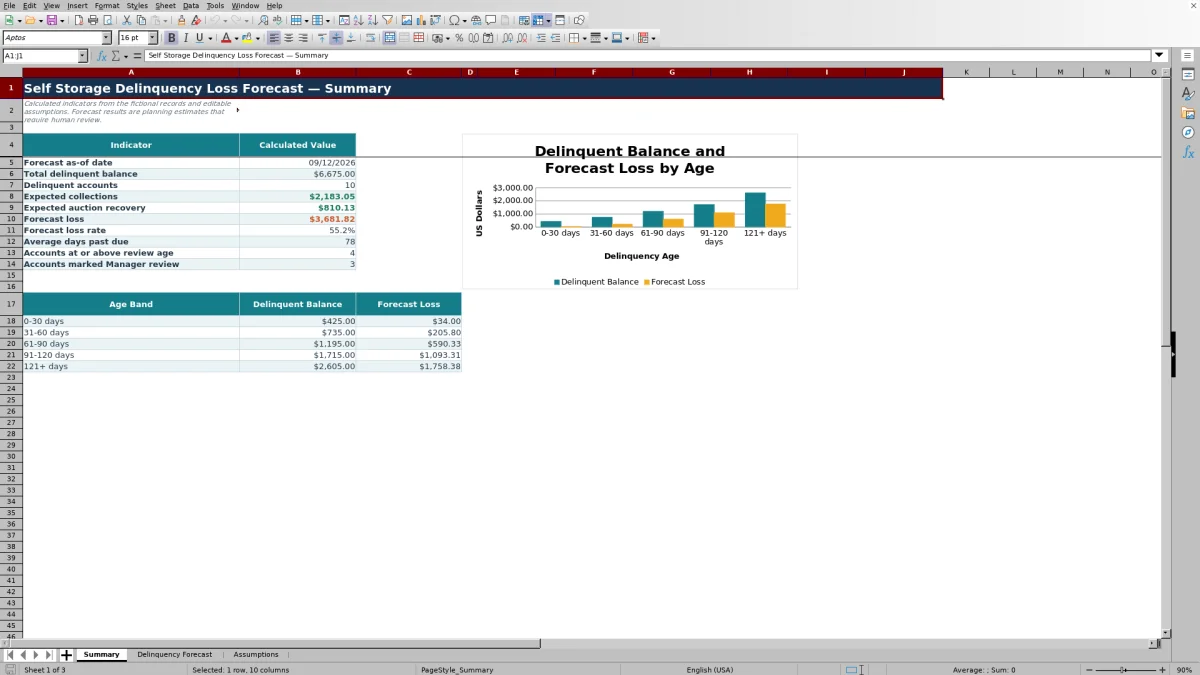
- See portfolio totals, loss rate, average days past due, review-age counts, and age-band concentrations in one summary.
- Adjust probabilities, recovery rates, the forecast date, and thresholds without rewriting formulas.
What the workbook contains
How to get started
1. Set the forecast assumptions
On the Assumptions sheet, enter the forecast as-of date, high-loss threshold, past-due review age, aging breakpoints, collection probabilities, and auction-recovery rates. Keep the minimum-day values in ascending order.
2. Enter delinquent account records
On the Delinquency Forecast sheet, use rows 5 through 104 to enter each facility, unit, period, delinquent amount, account owner, status, due date, and notes. Use the supplied dropdowns and validated input cells where available.
3. Check the calculated outputs
Read across each populated row to see days past due, the assigned collection probability, auction-recovery percentage, expected collection, expected auction recovery, and forecast loss.
4. Use the portfolio summary
Open the Summary sheet to examine delinquent balance, account count, expected collections, expected auction recovery, forecast loss, loss rate, average days past due, review-age counts, and results by age band.
How the delinquency loss forecast works
The workbook uses age-driven loss modeling. It subtracts each due date from the forecast as-of date, floors negative results at zero, and assigns collection and auction-recovery assumptions through the five minimum-day thresholds.
Expected collection equals the delinquent amount multiplied by collection probability. Auction recovery applies only to the amount left after expected collection. Forecast loss is the original delinquent amount minus those two recovery estimates, with a minimum result of zero.
Worked scenario for a fictional delinquent account
Input: A fictional account has a $1,000 delinquent balance, a June 29, 2026 due date, and a September 12, 2026 forecast date. The workbook calculates 75 days past due and assigns the 61–90 day assumptions: 48% collection probability and 5% auction recovery on the uncollected balance.
Result: Expected collection is $480. The remaining $520 produces $26 of expected auction recovery, leaving a $494 forecast loss.
Interpretation: The model estimates that 49.4% of this balance will remain unrecovered under the selected assumptions. Next decision: use the account owner, status, and notes fields to assign collection follow-up or auction review and decide whether the 61–90 day assumptions still fit the operating plan.
Using aging bands and recovery assumptions
The editable assumption grid contains five bands beginning at 0, 31, 61, 91, and 121 days. Default collection probabilities decline from 92% to 10%, while auction recovery on the uncollected amount rises from 0% to 25% across the bands.
Minimum-day thresholds must stay in ascending order because the account formulas use an approximate lookup. The high-loss threshold and past-due review age support visual flags and summary counts; they do not change the collection or recovery calculations.
Common errors and solutions
Blank aging usually means the due date, delinquent amount, or forecast as-of date is missing. Complete those inputs with valid dates and a positive amount.
Full-balance loss can appear when an amount is present but the inputs needed for collection and auction calculations are incomplete. Check the due date and forecast date before using the result.
If an account lands in the wrong band after an assumption edit, confirm that minimum-day thresholds remain sorted from lowest to highest. If Excel rejects an entry, check the applicable validation rule for lists, dates, amounts, whole days, or percentages.
Comparison with a blank spreadsheet
Use the prepared workbook when its verified fields and calculations fit the facility task. Start with a blank spreadsheet when you need a different model and can build and test every field and formula.
| Method | Setup | Calculations and review | Practical fit |
|---|---|---|---|
| This Excel workbook | Use the prepared structure in the validated file | Review the documented calculations and results | Local editable workflow supported by the workbook |
| Blank spreadsheet | Create the structure from scratch | Build and test every formula and control | A different model designed for the facility |
Workbook limits to consider
The model has 100 account rows, covering rows 5 through 104, and five configured aging bands. Extending either structure requires corresponding updates to formulas, validation, formatting, and summary ranges.
Forecast amounts depend on the entered balance, due date, forecast date, and aging assumptions. Facility, account owner, status, and notes support organization but do not change the account-level loss formula. Auction recovery is calculated on the uncollected remainder rather than the full delinquent balance.
Using the forecast in facility and portfolio workflows
Facility managers can filter the account sheet by facility, owner, or status to organize collection activity. Regional operators can use the Summary sheet to examine total exposure, forecast loss rate, average days past due, and concentrations by aging band.
Acquisition teams can enter an authorized sample of delinquent accounts, apply a consistent forecast date, and test how stated collection and auction assumptions affect estimated loss. Keep the source dates, balances, and assumption set aligned when comparing facilities or periods.
Frequently asked questions
How many delinquent accounts can the Excel workbook hold?
The Delinquency Forecast sheet provides 100 account rows, from row 5 through row 104. The formulas, validation rules, filters, and Summary calculations are configured around that range.
How does the workbook calculate auction recovery?
It first subtracts expected collection from the delinquent amount. The applicable auction-recovery percentage is then multiplied by that remaining uncollected balance.
Which aging bands are included by default?
The five default bands are 0–30, 31–60, 61–90, 91–120, and 121 or more days past due. Their minimum-day thresholds, collection probabilities, and auction-recovery rates are editable on the Assumptions sheet.
Why are the calculated aging and probability cells blank?
Days past due remains blank when the due date, delinquent amount, or forecast as-of date is missing. Because the probability and recovery lookups depend on days past due, those cells also remain blank until the required inputs are complete.
What does the Summary sheet display?
It displays the forecast date, delinquent balance, account count, expected collections, expected auction recovery, forecast loss, loss rate, average days past due, review-age counts, Manager review counts, and balance and loss totals by age band.
About the editors

Casey MonroeFacility operations editor

Elliot ParkFinance and performance editor