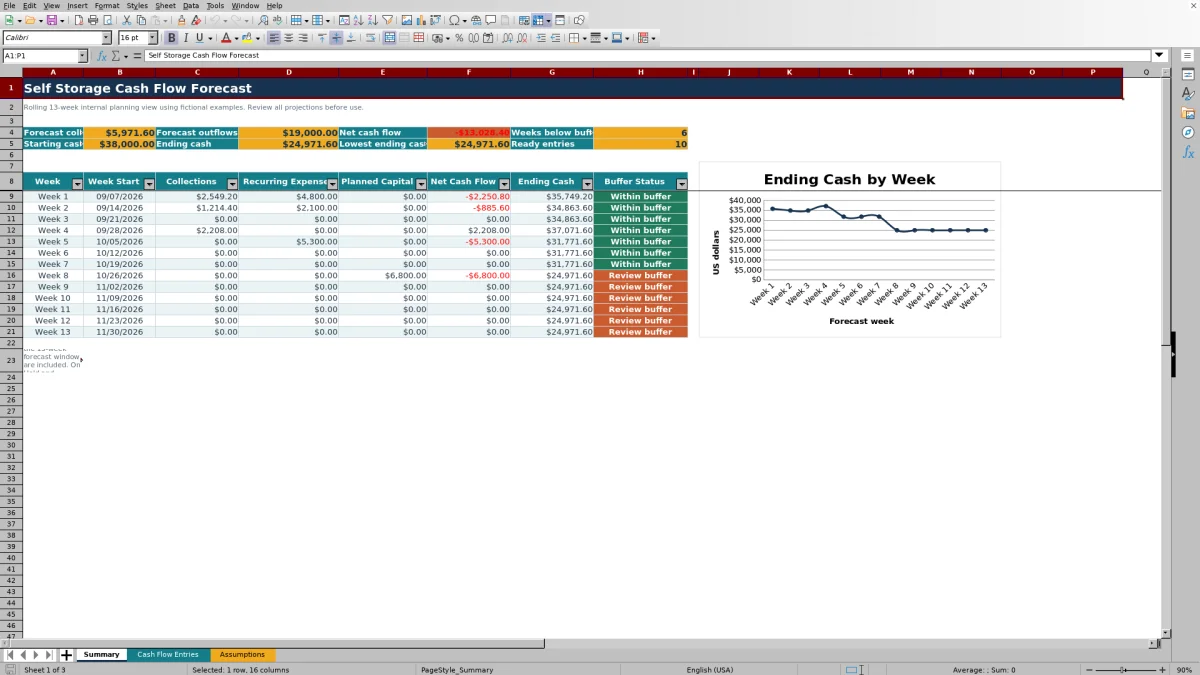
This self storage cash flow forecast Excel workbook organizes expected collections, recurring expenses, and planned capital payments into a rolling 13-week view. It calculates weekly net cash flow and projected ending cash so facility owners, managers, regional operators, and acquisition teams can review near-term liquidity.
The XLSX includes editable assumptions, 150 cash flow entry rows, row-level review checks, weekly buffer alerts, summary metrics, and an ending-cash chart. All facilities, units, roles, and transactions included in the workbook are fictional examples that can be replaced for internal planning.
How this template can help
- See expected inflows, operating outflows, and capital payments by week for 13 weeks.
- Identify projected weeks when ending cash falls below the selected minimum cash buffer.
- Adjust realization and forecast factors without rebuilding the weekly calculations.
- Keep facility, owner, status, due date, amount, and review details together in one workbook.
What the workbook contains
How to get started
1. Set the forecast assumptions
Open the Assumptions sheet and enter the Week 1 start date, starting cash, minimum cash buffer, collection realization rate, expense forecast factor, and capital forecast factor.
2. Add cash flow entries
On Cash Flow Entries, record each expected collection, recurring expense, or planned capital payment as a positive amount. Select its facility, owner, status, and due date, then add notes as needed.
3. Resolve entry review messages
Check the Review column and correct missing or invalid information. Only entries marked Ready and due within the forecast window are included in the weekly Summary calculations.
4. Review cash and update the plan
Use the Summary sheet to review weekly net cash flow, ending cash, the lowest projected cash balance, and buffer status. Update amounts, dates, statuses, and assumptions as expectations change.
How the 13-Week Cash Forecast Works
The workbook assigns each dated entry to one of 13 weekly periods beginning with the editable forecast start date. Ready entries are grouped by cash flow type and due date on the Summary sheet.
Expected collections become inflows, while recurring expenses and planned capital payments become outflows. Planned and confirmed items use the applicable assumption factor, completed items use 100% of their entered amount, and on-hold or canceled items contribute zero.
Worked Self Storage Scenario
Assume these are the only Ready entries in a fictional week: a $10,000 planned collection, a $4,000 confirmed recurring expense, and a $3,000 planned capital payment. Starting cash is $38,000, the collection realization rate is 92%, both outflow factors are 100%, and the minimum buffer is $25,000.
Input: The collection forecasts at $9,200, the recurring expense at $4,000, and the capital payment at $3,000. Result: Weekly net cash flow is $2,200, producing projected ending cash of $40,200. Interpretation: Ending cash remains $15,200 above the selected buffer. Next decision: The operator can keep the current schedule or test updated amounts and dates if collection timing or capital work changes.
Common Errors and Solutions
A negative amount can cause a review message because entry amounts are intended to be positive; the selected cash flow type determines direction. Enter the amount as a positive value and choose Expected Collection, Recurring Expense, or Planned Capital.
If a row does not reach Ready status, read its Review message and check the facility, cash flow type, amount, owner, status, and due date. If an expected recurring payment is missing from later weeks, add a separate dated entry for each payment because the workbook does not create repeat transactions automatically.
Using the Minimum Cash Buffer
The minimum cash buffer is an editable internal planning threshold. When projected ending cash for a week is below that amount, the Summary displays Review buffer; otherwise, it displays Within buffer.
The warning identifies timing that may need attention, but it does not determine what action to take. A manager might next review collection dates, verify expense timing, reconsider a planned capital payment, or update the starting cash assumption.
Comparison with a blank spreadsheet
Use the prepared workbook when its verified fields and calculations fit the facility task. Start with a blank spreadsheet when you need a different model and can build and test every field and formula.
| Method | Setup | Calculations and review | Practical fit |
|---|---|---|---|
| This Excel workbook | Use the prepared structure in the validated file | Review the documented calculations and results | Local editable workflow supported by the workbook |
| Blank spreadsheet | Create the structure from scratch | Build and test every formula and control | A different model designed for the facility |
Forecast Limits and Planning Boundaries
The forecast is limited to 13 weekly periods and 150 entry rows. It does not import bank activity, reconcile accounts, create recurring entries automatically, or replace an accounting system. The forecast moves only when users update the start date and underlying entries.
Results depend on the entered amounts, due dates, statuses, starting cash, and assumption factors. The minimum cash buffer is a user-selected review threshold, and forecast values should be updated when operating expectations change.
Frequently asked questions
Which cash flow entries appear on the Summary sheet?
Only entries whose Review column shows Ready and whose due dates fall within one of the 13 weekly periods are included. The Summary groups those entries as expected collections, recurring expenses, or planned capital payments.
How do Planned, Confirmed, and Completed statuses affect forecast amounts?
Planned and Confirmed entries use the applicable collection realization rate, expense forecast factor, or capital forecast factor. Completed entries use 100% of the entered amount.
What happens to On Hold or Canceled entries?
On Hold and Canceled entries receive a signed forecast amount of zero, so they do not contribute to weekly collections, expenses, capital payments, or ending cash.
Do recurring expenses repeat automatically?
No. Each expected payment requires its own entry and due date. Add separate rows for weekly, monthly, or other recurring payments that should appear within the forecast window.
Can the workbook be used for more than one self storage facility?
Yes. The Cash Flow Entries sheet includes a Facility field, and the Assumptions sheet contains the facility list used by its dropdown. The included facility names are fictional examples that can be replaced for internal planning.
About the editors

Casey MonroeFacility operations editor

Elliot ParkFinance and performance editor