The Self Storage Unit Transfer Tracker is an Excel workbook for documenting tenant moves from an old unit to a new unit. It keeps move dates, release deadlines, charges, access status, ownership, notes, and transfer status in one structured log.
Facility owners, managers, regional operators, and acquisition teams can use the XLSX to coordinate overlapping access and old-unit release while monitoring calculated indicators on the Summary sheet. Fictional sample records demonstrate the workflow before users replace them with their own operating data.
How this template can help
- Keep old-unit and new-unit details together for each tenant transfer.
- Monitor planned or actual overlap between move start and old-unit release.
- Track transfer charges, access status, ownership, and closeout progress.
- See upcoming releases, overdue releases, status counts, and other calculated indicators.
What the workbook contains
How to get started
1. Review the operating settings
Open the Assumptions sheet and confirm the permitted date range, overlap review limit, maximum unit area, maximum transfer charge, facilities, statuses, and assigned owners.
2. Enter the transfer record
On the Transfers sheet, assign a unique transfer ID and enter the facility, tenant alias, old and new units, move start date, old-unit release due date, charge information, access status, transfer status, and assigned owner.
3. Update release and closeout details
Enter the old-unit released date when the former unit is returned. Then update the charge, access, and transfer statuses so the record reflects the current stage of the move.
4. Check warnings and summary indicators
Resolve messages in the Review Warning column and use the Summary sheet to monitor active transfers, release deadlines, proposed charges, access closeouts, average overlap, and transfer-status counts.
A Structured Unit Transfer Workflow
One transfer record connects the tenant alias, facility, old unit, new unit, move dates, charge details, access stage, transfer status, assigned owner, and notes. This structure helps operators follow the move from initial planning through old-unit release and access closeout without separating related details across multiple lists.
Worked Scenario: Six-Day Unit Overlap
Input: A fictional tenant starts moving on September 10, 2026, with the old unit due for release on September 15, 2026. The released date is still blank, the transfer charge is $45 with a Proposed status, access is Both Units Active, and the transfer is In Progress.
Result: The overlap formula uses the due date while the released date is blank and calculates six inclusive days from September 10 through September 15.
Interpretation: Six days does not exceed the workbook's current seven-day overlap review limit, although the release date and other record conditions still need to remain current.
Next decision: Confirm whether the tenant released the old unit by September 15. Enter the actual release date, then update access, charge, and transfer statuses to reflect the outcome.
Overlap and Old-Unit Release Tracking
Inclusive overlap is calculated from the move start date through either the actual old-unit released date or, when that field is blank, the old-unit release due date. The formula returns no overlap value for a canceled transfer. Summary indicators count overdue releases and releases due within the next seven days when the old unit has not yet been marked released.
Common Errors and Solutions
The Review Warning formula helps surface records that need attention, including duplicate transfer IDs, missing required fields, release due dates before move start dates, released dates before move start dates, and completed transfers without an old-unit released date. It also uses the overlap setting when checking extended transfer periods.
- Replace a duplicate transfer ID with a unique value.
- Complete the required facility, tenant, unit, date, status, and owner fields.
- Correct a due or released date that falls before the move start date.
- Add the released date before treating a transfer as complete.
- Check completed records counted by the access closeout indicator and update Access Status to Closed Out when appropriate.
Summary Indicators for Daily Follow-Up
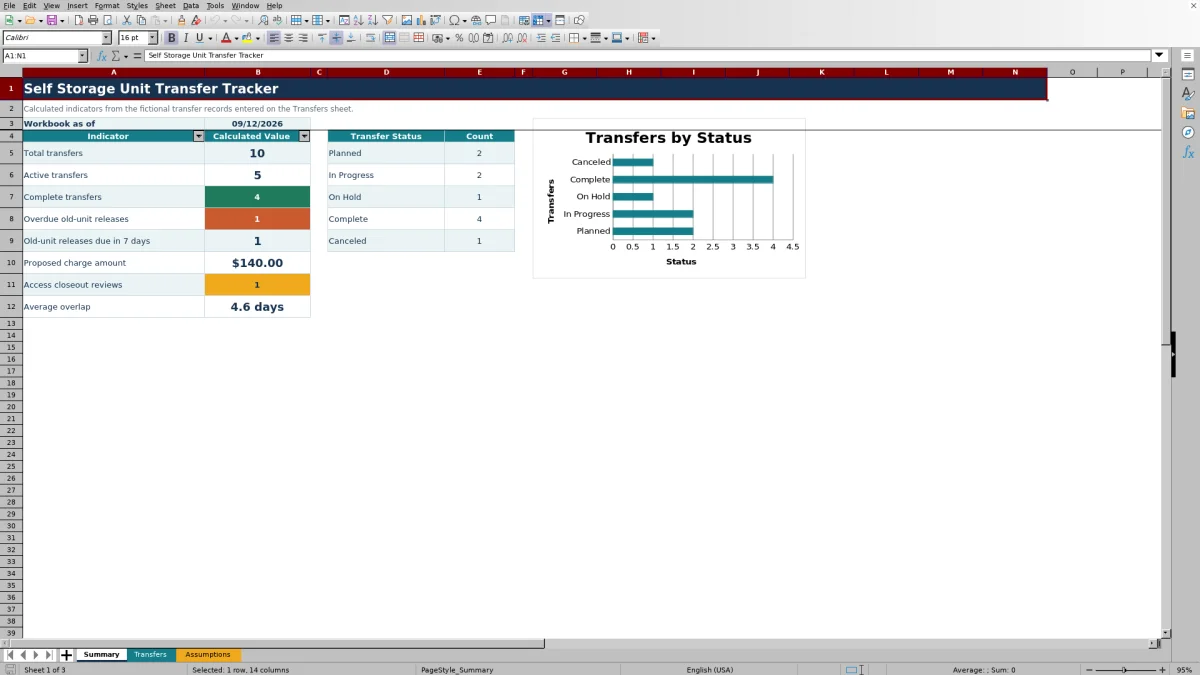
The Summary sheet calculates total, active, and complete transfers. It also reports overdue old-unit releases, releases due within seven days, the total amount of charges marked Proposed, completed transfers whose access status is not Closed Out, and average overlap. A chart displays counts for Planned, In Progress, On Hold, Complete, and Canceled records.
Comparison with a blank spreadsheet
Use the prepared workbook when its verified fields and calculations fit the facility task. Start with a blank spreadsheet when you need a different model and can build and test every field and formula.
| Method | Setup | Calculations and review | Practical fit |
|---|---|---|---|
| This Excel workbook | Use the prepared structure in the validated file | Review the documented calculations and results | Local editable workflow supported by the workbook |
| Blank spreadsheet | Create the structure from scratch | Build and test every formula and control | A different model designed for the facility |
Workbook Limits and Operating Boundaries
The workbook provides 120 transfer rows, covering rows 5 through 124. Because it uses fixed ranges rather than an Excel table, expansion beyond those rows requires corresponding updates to formulas, validation, formatting, and summary ranges.
Current assumptions permit transfer dates from January 1, 2020, through December 31, 2036, unit areas up to 10,000 square feet, and transfer charges up to $100,000. These are editable operating limits, not pricing commitments. Dropdowns are limited to the visible option ranges, and the workbook does not provide external automation.
Frequently asked questions
What does the overlap-days field calculate?
It counts calendar days inclusively from the move start date through the actual old-unit released date. If the released date is blank, it uses the old-unit release due date instead. Canceled transfers return a blank overlap value.
Does the workbook post charges or change unit access?
No. It records transfer-charge and access statuses for operational tracking, but it does not post charges, control gates or locks, release units, or connect to external systems.
How many unit transfers can the workbook hold?
The Transfers sheet contains 120 prepared entry rows, from row 5 through row 124. Those rows include the overlap and review-warning formulas.
Can facilities, statuses, and assigned owners be changed?
Yes. The Assumptions sheet contains visible option lists for facilities, transfer statuses, charge statuses, access statuses, and assigned owners. The existing dropdowns reference the listed ranges, so expanding a list beyond its prepared range requires updating the related validation reference.
What issues can the Review Warning column identify?
It can flag conditions such as duplicate transfer IDs, missing required fields, invalid release timing, a completed transfer without a released date, and overlap that exceeds the configured review limit.
About the editors

Casey MonroeFacility operations editor

Elliot ParkFinance and performance editor