This self storage lease signing checklist is an Excel workbook for documenting the administrative steps associated with each lease. It records the facility, unit, lease dates, term, rent, checklist owner, required fields, acknowledgments, ID review, stored lease copy, due date, and notes.
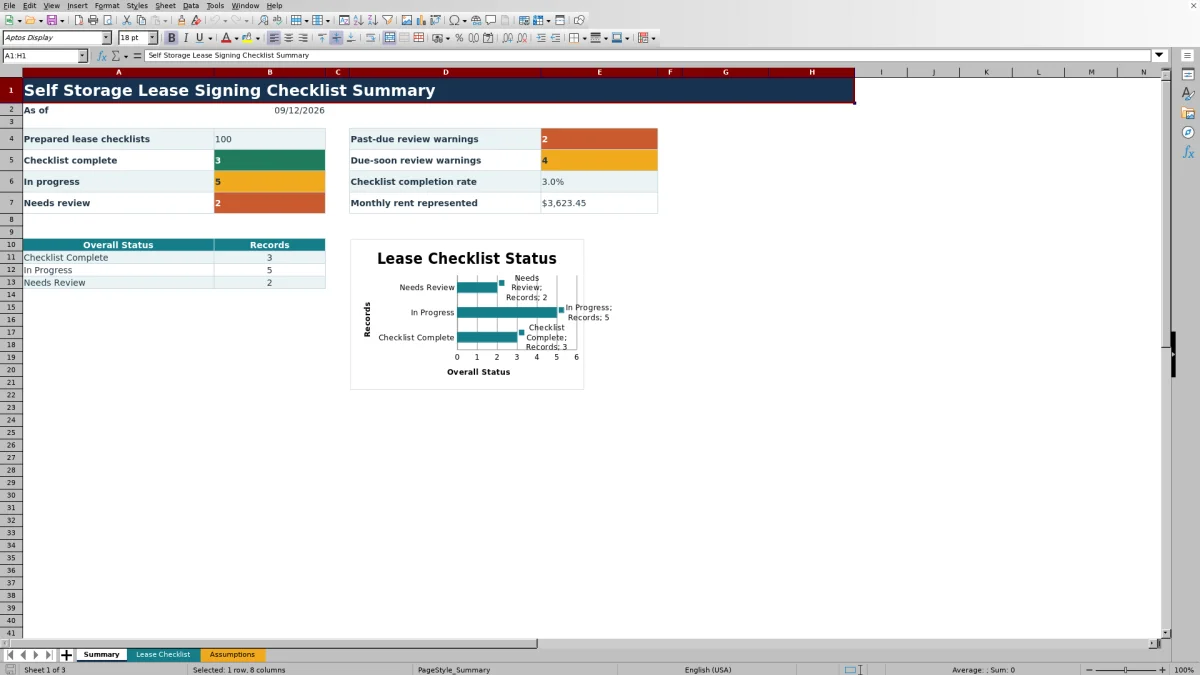
The XLSX spreadsheet calculates an overall status and review warning for as many as 100 checklist records. Its Summary sheet reports status counts, due-date warnings, completion rate, and monthly rent represented, while the Assumptions sheet controls entry limits and list options.
How this template can help
- Keeps core lease details and signing checks together in one row per lease.
- Shows which checklists are complete, in progress, or missing required information.
- Flags unfinished checklists that are past due or approaching their review date.
- Summarizes checklist volume, completion, review warnings, and entered monthly rent.
What the workbook contains
How to get started
1. Review the assumptions
Open the Assumptions sheet to confirm the five-day due-soon window, entry limits, accepted date range, facility list, checklist owners, and task statuses.
2. Enter one lease per row
On the Lease Checklist sheet, complete the facility, unit, lease start, term, monthly rent, checklist owner, due date, and any useful notes.
3. Update each signing check
Select Not Started, In Review, or Complete for Required Fields, Acknowledgments, ID Reviewed, and Lease Copy Stored. Leave the calculated Overall Status and Review Warning cells unchanged.
4. Resolve warnings and use the summary
Address missing entries and unfinished tasks, then review the Summary sheet for status totals, due-date warnings, completion rate, and represented monthly rent before staff makes the access decision.
What the Lease Signing Checklist Tracks
The workbook uses one row per lease to keep the facility, unit, lease start, term, monthly rent, owner, four signing checks, due date, calculated status, warning, and notes together. The four tracked checks are Required Fields, Acknowledgments, ID Reviewed, and Lease Copy Stored.
Facility names, checklist owners, and task statuses use lists maintained on the Assumptions sheet. Lease terms, rent amounts, and dates also have validation limits to promote consistent entries.
Worked Scenario
Input: A fictional Juniper Key Storage lease has all core fields entered. Required Fields and ID Reviewed are Complete, Acknowledgments is In Review, Lease Copy Stored is Not Started, and the due date is September 13, 2026. Assume the workbook's TODAY function evaluates to September 10, 2026 and the due-soon window is five days.
Result: The Overall Status displays In Progress, and the Review Warning displays Due soon - review.
Interpretation: The row contains the required entries, but two signing checks are not Complete and the due date falls within the configured review window.
Next decision: The checklist owner follows up on the acknowledgment and stored copy, updates their statuses, and gives the completed record to the staff member responsible for the access decision.
How Status and Warning Formulas Work
A completely empty row produces no status. A started row becomes Needs Review when any field from Facility through Due Date is blank. When all required entries are present, the row becomes Checklist Complete only if all four signing checks are marked Complete; otherwise, it remains In Progress.
An unfinished record can display Enter due date for review, Past due - review before access, Due soon - review, or Pending review. A completed checklist displays Human access decision required because the administrative status does not itself authorize access.
Common Errors and Solutions
Missing required entries are the most direct cause of a Needs Review status. Check every cell from Facility through Due Date and fill in the omitted value.
- If a task remains In Progress, confirm that all four signing checks use the exact Complete option when finished.
- If a date, term, or rent entry is rejected, compare it with the limits shown on the Assumptions sheet.
- If a due-soon warning appears unexpectedly, review the Due Date, the current date returned by TODAY, and the configured due-soon window.
- If a calculated result disappears, avoid typing in Overall Status or Review Warning and restore the formula from an intact checklist row.
Workbook Limits and Configuration
The existing checklist table and summary formulas cover 100 checklist rows, from row 6 through row 105. The visible facility and owner lists each contain four fictional options, and the task list contains Not Started, In Review, and Complete.
The current assumptions set a five-day due-soon window, a 120-month maximum lease term, a $2,500 maximum monthly rent entry, and accepted lease or due dates from January 1, 2021 through December 31, 2046. The assumption cells permit controlled edits within their own validation ranges, but operational changes should be reviewed before data entry continues.
Comparison with a blank spreadsheet
Use the prepared workbook when its verified fields and calculations fit the facility task. Start with a blank spreadsheet when you need a different model and can build and test every field and formula.
| Method | Setup | Calculations and review | Practical fit |
|---|---|---|---|
| This Excel workbook | Use the prepared structure in the validated file | Review the documented calculations and results | Local editable workflow supported by the workbook |
| Blank spreadsheet | Create the structure from scratch | Build and test every formula and control | A different model designed for the facility |
Using the Summary for Follow-Up
The Summary sheet counts prepared checklists and separates them into Checklist Complete, In Progress, and Needs Review. It also counts past-due and due-soon warnings, calculates the completion rate, and totals entered monthly rent when at least one prepared checklist exists.
Managers can use these figures to identify records needing follow-up, then return to the Lease Checklist sheet for the facility, unit, owner, due date, and notes associated with each item. The status chart provides a compact view of the three overall status categories.
Frequently asked questions
Does Checklist Complete authorize access to the storage unit?
No. Checklist Complete is an administrative indicator showing that all required entries are present and all four tracked signing checks are marked Complete. The workbook states that a staff member must still make the access decision.
Why can a review warning change from one day to the next?
The warning formulas use Excel's TODAY function. An unfinished checklist can move from Pending review to Due soon - review or Past due - review before access as the current date approaches or passes its due date.
Which task statuses can I select?
The configured task statuses are Not Started, In Review, and Complete. They apply to Required Fields, Acknowledgments, ID Reviewed, and Lease Copy Stored.
Can I replace the fictional facilities and checklist owners?
Yes. The Assumptions sheet contains four visible facility options and four checklist-owner options that can be replaced with operational names while preserving the validation ranges used by the checklist.
How many lease checklists does the workbook support?
The existing Lease Checklist table contains 100 entry rows, covering rows 6 through 105. The Summary formulas also reference those same 100 rows.
About the editors

Casey MonroeFacility operations editor

Elliot ParkFinance and performance editor