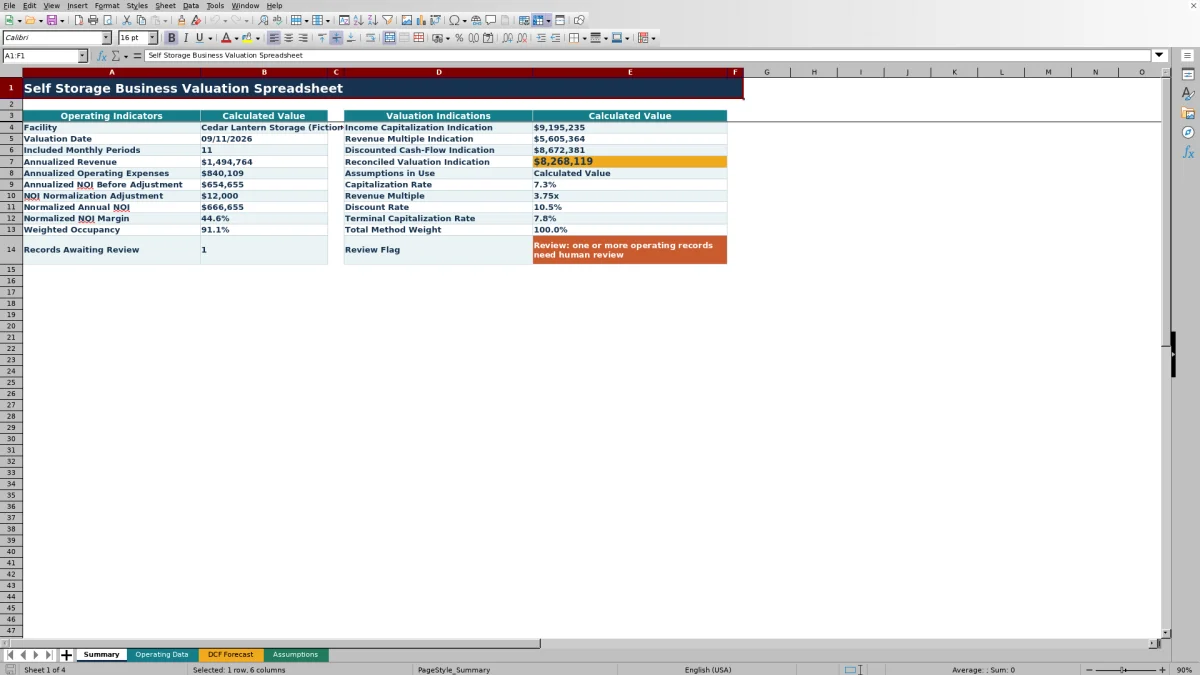
This self storage business valuation spreadsheet is an Excel workbook for comparing income capitalization, gross revenue multiple, and discounted cash-flow indications for a selected facility.
The XLSX organizes monthly operating records, editable valuation assumptions, a 10-year DCF schedule, and a summary that reconciles the three methods using assigned weights.
How this template can help
- Compare income capitalization, revenue multiple, and discounted cash-flow indications in one model.
- Convert included monthly records into annualized revenue, operating expenses, normalized NOI, and weighted occupancy.
- Test how changes to growth rates, valuation rates, selling costs, and method weights affect the indication.
- Identify operating records, assumptions, and method weights that need attention before using the result.
What the workbook contains
How to get started
1. Enter monthly operating records
Add one record per facility and period on the Operating Data sheet. Enter revenue, operating expenses, total units, occupied units, ownership details, dates, and notes, then assign Included, Review, or Excluded status.
2. Set the valuation assumptions
On the Assumptions sheet, select the facility and valuation date, choose the lookback period, and enter the NOI adjustment, capitalization rate, revenue multiple, DCF assumptions, and method weights.
3. Inspect the DCF forecast
Use the DCF Forecast sheet to follow projected revenue, operating expenses, NOI, terminal value, discount factors, and present values for up to 10 years.
4. Read the summary
Compare the three method indications, reconciled value, operating indicators, total method weight, records awaiting review, and final review flag on the Summary sheet.
How the valuation model works
The workbook converts status-controlled monthly records into annualized revenue and operating expenses. It subtracts expenses from revenue, applies the annual NOI normalization adjustment, and calculates normalized annual NOI.
That operating base supports three valuation indications: normalized NOI divided by the capitalization rate, annualized revenue multiplied by the revenue multiple, and the present value of forecast NOI plus terminal value. Entered method weights produce a weighted reconciled indication.
Worked fictional valuation scenario
Input: Assume 12 included monthly records produce $1,500,000 of annualized revenue and $840,000 of annualized operating expenses. Add a $12,000 annual NOI adjustment. Use a 7.25% capitalization rate, a 3.75x revenue multiple, a 10-year forecast, 3.00% revenue growth, 3.25% expense growth, a 7.75% terminal capitalization rate, a 10.50% discount rate, and 2.00% terminal selling costs.
Result: Normalized annual NOI is $672,000. The income capitalization indication is about $9.27 million, the revenue multiple indication is $5.625 million, and the DCF indication is about $8.74 million. With weights of 40%, 20%, and 40%, respectively, the reconciled indication is about $8.33 million.
Interpretation: The range between the revenue multiple and income capitalization results shows that the selected assumptions materially affect the conclusion. The reconciled figure reflects the chosen weighting rather than eliminating that difference.
Next decision: Confirm the included monthly totals and occupancy records, then test reasonable changes to the capitalization rate, revenue multiple, growth assumptions, discount rate, and method weights.
Managing monthly operating records
Each Operating Data row includes the facility, period, revenue, operating expenses, unit counts, record owner, status, due date, and notes. NOI and occupancy are calculated automatically when the required inputs are present.
Only records marked Included and matching the selected facility and date range feed the annualized indicators. Review records remain outside the valuation calculations until their status changes, while Excluded records are not used.
Errors and solutions
Check the status field first when summary values are blank. Confirm that the facility name matches the Assumptions sheet, the period falls within the selected lookback window, and the row is marked Included.
- If occupancy is blank, enter valid total and occupied unit counts and make sure occupied units do not exceed total units.
- If DCF rows are blank, confirm that annualized operating values exist and that the forecast year setting includes those rows.
- If the summary reports a method-weight issue, adjust the three valuation weights so they total 100%.
- If normalized NOI is not positive, check revenue, operating expenses, record statuses, and the normalization adjustment.
- If records are awaiting review, update or resolve the rows carrying Review status.
Comparison with a blank spreadsheet
Use the prepared workbook when its verified fields and calculations fit the facility task. Start with a blank spreadsheet when you need a different model and can build and test every field and formula.
| Method | Setup | Calculations and review | Practical fit |
|---|---|---|---|
| This Excel workbook | Use the prepared structure in the validated file | Review the documented calculations and results | Local editable workflow supported by the workbook |
| Blank spreadsheet | Create the structure from scratch | Build and test every formula and control | A different model designed for the facility |
Workbook limits
Model boundaries: The Operating Data sheet supports 120 monthly rows, and the DCF schedule supports no more than 10 annual periods. Calculations center on the facility selected in the Assumptions sheet.
The workbook does not contain charts, Excel tables, a comparable-sales database, or automatic local market assumptions. Its DCF applies the same annual NOI adjustment in each active forecast year and calculates terminal value from the selected terminal capitalization rate and selling-cost assumption.
Using the result for the next operating decision
Start with the method spread rather than the reconciled figure alone. A large gap can point to sensitivity in the capitalization rate, revenue multiple, growth rates, expense growth, discount rate, or terminal capitalization rate.
Facility managers can use the operating indicators to trace the result back to revenue, expenses, NOI, and occupancy. Regional operators and acquisition teams can rerun the model with consistent assumptions to compare internal scenarios across selected facilities.
Frequently asked questions
Which valuation methods are included in the Excel workbook?
The workbook calculates income capitalization, gross revenue multiple, and discounted cash-flow indications. It then combines them using the three method weights entered on the Assumptions sheet.
Which monthly records affect the valuation?
A record must match the selected facility, fall within the valuation date and lookback window, and have Included status. Rows marked Review or Excluded are not used in the valuation calculations.
How does the spreadsheet calculate occupancy?
Each populated row divides occupied units by total units. The Summary sheet calculates weighted occupancy by dividing included occupied units by included total units for the selected facility and period.
How many years can the DCF forecast cover?
The DCF Forecast sheet contains 10 annual rows. The editable forecast-year assumption can activate from one through 10 years.
What happens if the valuation weights do not total 100%?
The Assumptions sheet totals the three method weights, and the Summary sheet displays a review flag when that total differs from 100%. Adjust the income capitalization, revenue multiple, and DCF weights before using the reconciled indication.
About the editors

Casey MonroeFacility operations editor

Elliot ParkFinance and performance editor