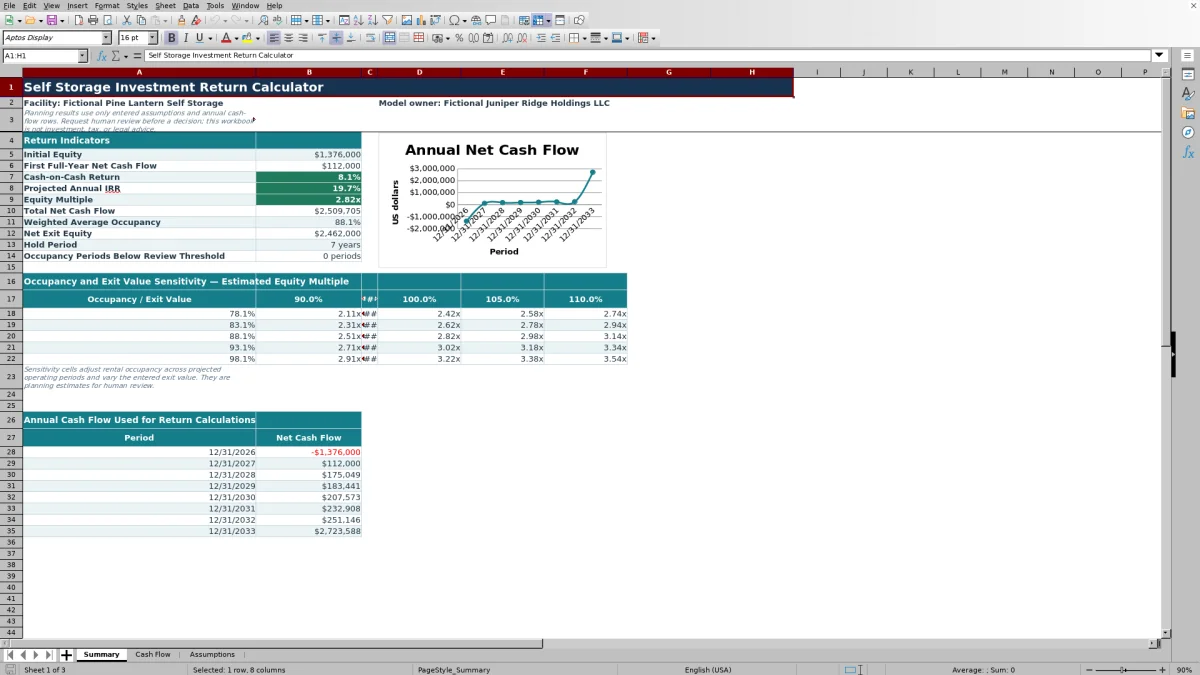
This self storage investment return calculator is an Excel workbook for modeling acquisition equity, annual operating cash flow, financing outflows, and terminal sale proceeds. It calculates cash-on-cash return, projected annual IRR, equity multiple, total net cash flow, weighted average occupancy, and net exit equity.
The XLSX includes separate Assumptions, Cash Flow, and Summary sheets. Replace the fictional example inputs, complete the annual occupancy and capital-spending schedule, and use the summary outputs to evaluate how operating performance and exit value affect the modeled equity return.
How this template can help
- Consolidates acquisition, operating, debt, and exit assumptions into one annual equity model.
- Calculates cash-on-cash return, projected annual IRR, equity multiple, and other return indicators.
- Tests estimated equity multiple across five occupancy cases and five exit-value cases.
- Tracks annual status and notes while counting occupancy periods below a selected threshold.
What the workbook contains
How to get started
1. Enter the acquisition assumptions
Replace the fictional facility details, dates, purchase price, acquisition costs, initial improvements, debt proceeds, and operating assumptions on the Assumptions sheet.
2. Complete the annual cash-flow schedule
Enter period-end dates in chronological order without gaps. Add occupancy, capital spending, status, and notes for each applicable operating period.
3. Check the calculated cash flows
Confirm the formula-driven rental revenue, other income, operating expenses, debt service, owner equity contribution, sale proceeds, loan payoff, and net cash flow.
4. Evaluate the return outputs
Use the Summary sheet to examine cash-on-cash return, projected annual IRR, equity multiple, weighted average occupancy, net exit equity, and the occupancy and exit-value sensitivity matrix.
How the Annual Return Model Works
The annual model begins with acquisition funding and then calculates each operating period from potential rental revenue, occupancy, other income, operating expenses, capital spending, and debt service. The final modeled period adds sale proceeds after the entered exit-cost percentage and deducts the entered loan payoff.
Initial equity equals purchase price plus acquisition costs and initial improvements, less debt proceeds. The acquisition-date cash-flow row records that amount as an owner equity outflow.
Understanding the Main Return Indicators
Cash-on-cash return divides first full-year net cash flow by initial equity. Capital spending and debt service in that year therefore affect the result.
Projected annual IRR applies Excel's IRR function to the populated annual net cash-flow series. Equity multiple divides total positive net cash flows by the absolute value of total negative net cash flows.
The Summary sheet also reports total net cash flow, revenue-weighted average occupancy, net exit equity, hold period, and the number of populated occupancy periods below the selected threshold.
Worked Self-Storage Acquisition Scenario
Input: Consider a fictional facility with a $3,200,000 purchase price, $96,000 of acquisition costs, $180,000 of initial improvements, and $2,100,000 of debt proceeds. The calculated initial equity is $1,376,000.
For the first full year, enter $720,000 of potential rental revenue, 80% occupancy, $36,000 of other income, $300,000 of operating expenses, $25,000 of capital spending, and $160,000 of debt service. Result: Net cash flow is $127,000, producing a cash-on-cash return of about 9.2%.
Interpretation: The modeled first year generates about nine cents of net cash flow for each dollar of initial equity. Next decision: Test lower occupancy and exit-value cases, then compare the resulting equity multiple with the acquisition team's internal criteria.
Occupancy and Exit-Value Sensitivity
The Summary sheet combines five occupancy cases with exit values equal to 90%, 95%, 100%, 105%, and 110% of the entered exit value. Occupancy cases are centered on weighted average occupancy and adjust it by minus 10, minus 5, zero, plus 5, and plus 10 percentage points, with downside cases floored at zero.
Each intersection estimates an equity multiple after adjusting rental revenue for the selected occupancy case and net sale proceeds for the selected exit-value case. Other modeled cash flows remain unchanged.
Common Errors and Solutions
Blank IRR: confirm that the annual schedule contains at least two populated net cash flows, including an initial negative equity outflow and subsequent cash flows.
Blank operating cash flow: enter occupancy for the period and confirm that its date falls within the modeled hold period.
Unexpected first-year return: make sure the first full-year date on the Assumptions sheet exactly matches a date in the Cash Flow schedule.
Incorrect percentage input: enter 80% as 0.80 rather than 80 because occupancy is validated from zero through one.
Missing terminal proceeds: align the final annual period with the first full-year end and hold-period assumptions, then check exit value, exit costs, and loan payoff.
Comparison with a blank spreadsheet
Use the prepared workbook when its verified fields and calculations fit the facility task. Start with a blank spreadsheet when you need a different model and can build and test every field and formula.
| Method | Setup | Calculations and review | Practical fit |
|---|---|---|---|
| This Excel workbook | Use the prepared structure in the validated file | Review the documented calculations and results | Local editable workflow supported by the workbook |
| Blank spreadsheet | Create the structure from scratch | Build and test every formula and control | A different model designed for the facility |
Model Limits to Consider
This is an annual facility-level model, not a monthly lease-up or unit-level operating forecast. IRR uses equally spaced periods through Excel's IRR function rather than date-specific XIRR calculations.
Debt service and loan payoff are entered assumptions because the workbook does not include a loan amortization schedule. Exit value is also entered directly rather than calculated from a capitalization rate.
The sensitivity matrix changes occupancy and exit value while holding other assumptions constant. Its estimated equity multiple can differ from the headline equity multiple if a later operating period contains negative net cash flow, and upside occupancy cases are not explicitly capped at 100%.
Frequently asked questions
What inputs does the self storage investment return calculator require?
The workbook uses acquisition dates and costs, debt proceeds, first-year revenue and expenses, annual debt service, growth rates, hold period, exit value, exit costs, loan payoff, annual occupancy, and capital spending.
How does the Excel workbook calculate cash-on-cash return?
It divides first full-year net cash flow by initial equity. First full-year net cash flow includes occupied rental revenue, other income, operating expenses, capital spending, and debt service.
Why might projected annual IRR be blank?
IRR can remain blank when there are too few populated cash flows, when the period and net-cash-flow counts do not match, or when the cash-flow pattern does not produce a valid IRR.
What does the sensitivity matrix measure?
It estimates equity multiple across five occupancy cases and five exit-value cases. Occupancy shifts around weighted average occupancy, while exit value ranges from 90% to 110% of the entered assumption.
Does the workbook include monthly projections or a loan amortization schedule?
No. The cash-flow schedule uses annual periods, and debt proceeds, annual debt service, and terminal loan payoff are entered assumptions rather than outputs from a separate amortization schedule.
About the editors

Casey MonroeFacility operations editor

Elliot ParkFinance and performance editor