This self storage tenant communication log is an Excel workbook for documenting calls, emails, text messages, in-person discussions, mailed letters, outcomes, and next actions by facility and unit.
The structured XLSX includes 120 prepared communication rows, editable operating lists, date and entry validation, calculated review prompts, and a summary of communication activity and follow-up needs.
How this template can help
- Maintain a consistent chronological record of communication dates, methods, outcomes, notes, and next actions.
- Identify incomplete entries, missing due dates, overdue follow-ups, due-soon items, and stale open records.
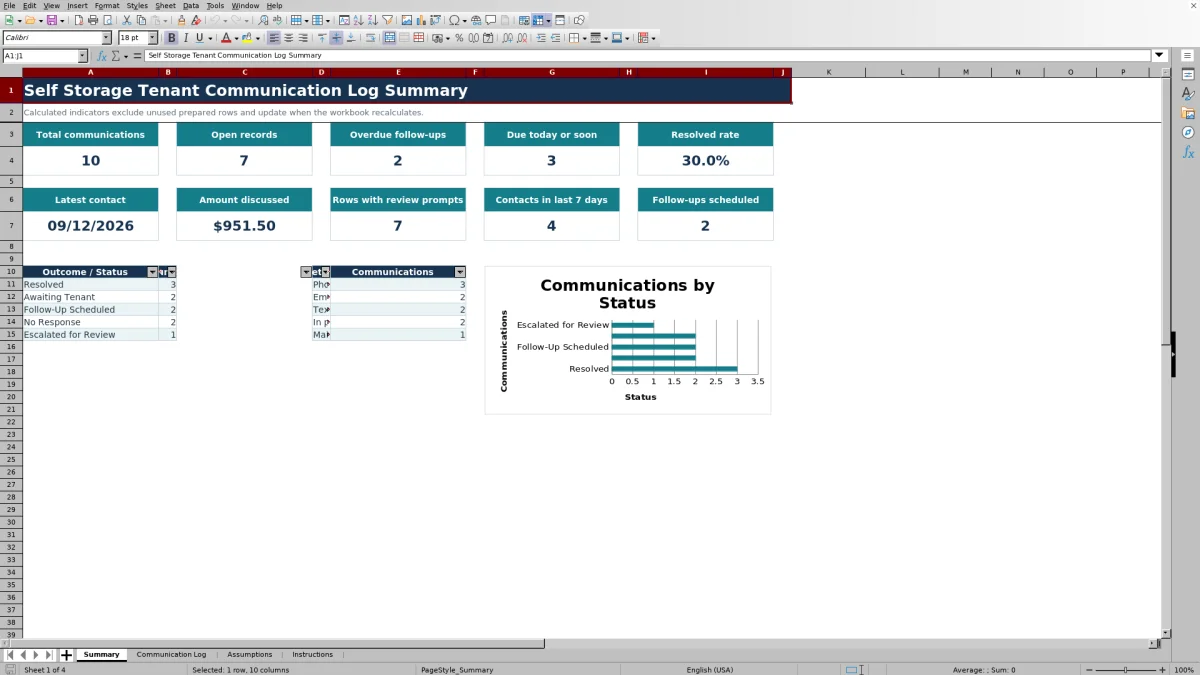
- Review communication volume, open records, resolved rate, recent contacts, methods, and statuses from one summary.
- Standardize facility, method, contact owner, and status entries through editable lists.
What the workbook contains
How to get started
1. Configure the operating lists
Open the Assumptions sheet and replace the fictional facilities, contact owners, methods, and statuses with values that match your operation. Adjust the due-soon and stale-record limits if needed.
2. Enter one communication per row
Use the Communication Log to enter the contact date, facility, unit, method, contact owner, and outcome. Use the unit label rather than a tenant name.
3. Record the outcome and next action
Summarize the discussion in Notes / Next Action. Add a due date when another step is planned and enter an amount only when a dollar amount was discussed.
4. Review prompts and summary indicators
Check the Review Flag column for records needing attention. Use the Summary sheet and table filters to monitor open items, overdue follow-ups, scheduled follow-ups, statuses, and communication methods.
Organize Tenant Communication by Facility and Unit
The workbook creates a chronological record with one row for each documented contact. Each record can include the contact date, facility, unit, method, contact owner, outcome or status, next-action date, amount discussed, notes, and a calculated review flag.
The prepared table contains 120 communication rows. Facility, method, contact owner, and status selections come from editable lists on the Assumptions sheet, helping operators use consistent entries across the log.
Worked Scenario for a Scheduled Follow-Up
Input: Assume the workbook is recalculated on September 9, 2026. Casey Fiction records a September 8 phone call for fictional Juniper Key Storage, unit C-031, selects Follow-Up Scheduled, enters September 14 as the next-action date, and notes that a callback is needed to confirm the outcome.
Result: With the supplied seven-day due-soon window, the populated record produces a Due soon prompt after recalculation and contributes to the applicable summary counts.
Interpretation: The communication is documented, but the selected status and future due date show that another action remains open.
Next decision: The contact owner can keep the callback on the work queue, document the next communication in a new row, and update the outcome based on what occurs.
Use Review Flags to Find Records Needing Attention
The Review Flag formulas evaluate populated rows for missing required details, a Follow-Up Scheduled status without a due date, overdue follow-ups, due-soon actions, and stale open records. The timing logic uses the workbook's TODAY() value and the limits entered on the Assumptions sheet.
The Summary sheet complements these prompts with total communications, open records, overdue follow-ups, items due today or soon, resolved rate, latest contact, amount discussed, recent contacts, scheduled follow-ups, and counts by status and method.
Common Entry Errors and Solutions
Common correction: If a row shows Review incomplete row, check that the facility, unit, method, contact owner, status, and notes are populated. If Follow-Up Scheduled is selected, add the next-action due date.
- Use a unit label instead of entering a tenant name.
- Do not enter a future contact date; the contact-date validation ends at the current date.
- Enter only nonnegative discussion amounts within the allowed range.
- Recalculate the workbook when date-sensitive flags or summary values appear out of date.
- Treat each flag as a prompt, not as proof that a call, message, letter, or follow-up occurred.
Comparison with a blank spreadsheet
Use the prepared workbook when its verified fields and calculations fit the facility task. Start with a blank spreadsheet when you need a different model and can build and test every field and formula.
| Method | Setup | Calculations and review | Practical fit |
|---|---|---|---|
| This Excel workbook | Use the prepared structure in the validated file | Review the documented calculations and results | Local editable workflow supported by the workbook |
| Blank spreadsheet | Create the structure from scratch | Build and test every formula and control | A different model designed for the facility |
Understand the Workbook's Operational Limits
Operational limit: The workbook is a documentation and review tool. It does not process payments, generate notices, connect to facility systems, verify message delivery, or establish an official tenancy status.
Amounts are discussion references only. Review prompts depend on the information entered, the Assumptions settings, TODAY(), and workbook recalculation, so operators should apply their established procedures before taking action.
Maintain a Useful Ongoing Record
Add a new row for each contact rather than overwriting earlier communication history. Keep notes concise but specific about what occurred, what is expected next, who owns the follow-up, and when it is due.
Use the table filters to focus on a facility, method, owner, status, or due date. Review the Summary sheet for broader activity patterns, then return to the underlying log before deciding which records need attention.
Frequently asked questions
What is the self storage tenant communication log used for?
It is used to document self-storage communication by date, facility, unit, method, contact owner, outcome, follow-up date, amount discussed, and notes. It also provides calculated prompts and summary indicators for managing open work.
Can this Excel workbook send tenant messages or notices?
No. The workbook records communication activity but does not send calls, emails, texts, letters, or notices. It also does not verify delivery or connect to a facility-management system.
How many communication entries can the prepared log hold?
The Communication Log contains 120 prepared data rows, covering rows 6 through 125 beneath the table header.
How do the due-soon and stale-record settings work?
The Assumptions sheet is prefilled with a seven-calendar-day due-soon window and a 14-calendar-day stale-open-record limit. Both settings accept whole numbers from 0 through 365 and are used by the workbook's review formulas.
Can the dropdown options be changed?
Yes. The facility, communication method, contact owner, and status options are stored on the Assumptions sheet and can be edited to match local operating practice.
About the editors

Casey MonroeFacility operations editor

Elliot ParkFinance and performance editor