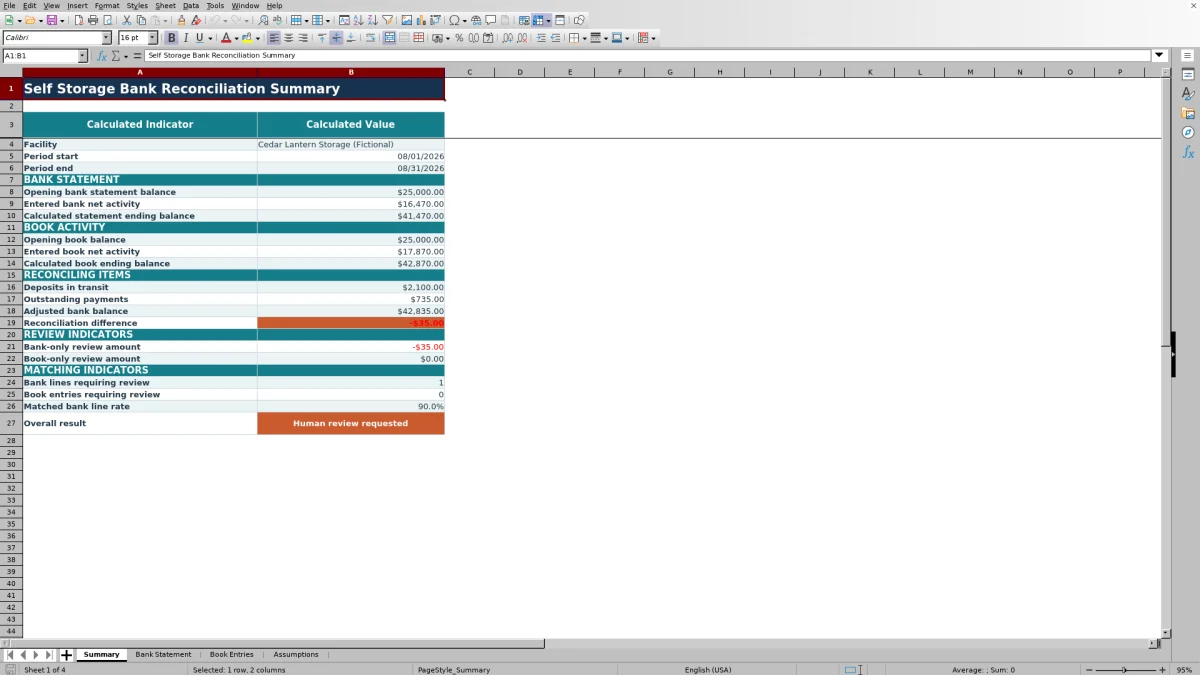
This self storage bank reconciliation Excel workbook compares entered bank statement activity with book entries for a selected facility and period. It calculates statement and book balances, deposits in transit, outstanding payments, and the remaining reconciliation difference.
The XLSX includes Summary, Bank Statement, Book Entries, and Assumptions sheets. Facility operators can enter signed transaction amounts, connect records with references, assign owners, add notes, and use calculated statuses to identify items that need follow-up.
How this template can help
- Bring bank activity, book entries, reconciling items, and monthly results into one structured workbook.
- See how deposits in transit and outstanding payments affect the adjusted bank balance.
- Identify missing references, unmatched records, and amount differences before completing the reconciliation.
- Focus the summary on one selected facility and reporting period at a time.
What the workbook contains
How to get started
1. Set the reconciliation period
Open the Assumptions sheet and select the facility. Enter the period start, period end, opening bank statement balance, opening book balance, and acceptable match tolerance.
2. Enter bank statement activity
Add each bank line to the Bank Statement sheet. Use positive amounts for activity that increases the bank balance and negative amounts for activity that decreases it. Include a book reference when a corresponding book entry exists.
3. Enter book activity
Add ledger transactions to the Book Entries sheet using the same signed-amount convention. Enter a bank reference for cleared items; leave it blank for uncleared deposits or payments so the workbook can classify the reconciling item.
4. Resolve the summary difference
Check calculated statuses on both activity sheets, then use the Summary sheet to examine ending balances, reconciling items, review counts, the matched bank line rate, and the reconciliation difference.
What the Workbook Reconciles
The workbook filters entered activity by the selected facility and period. It adds signed bank transactions to the opening statement balance, adds signed book transactions to the opening book balance, and then applies deposits in transit and outstanding payments to calculate the adjusted bank balance.
The Summary sheet also displays bank-only and book-only amounts, records requiring follow-up, the matched bank line rate, and the final difference between adjusted bank and book balances.
Worked Self Storage Reconciliation Scenario
Assume a fictional facility starts August with a $25,000 bank balance and a $25,000 book balance. The operator enters $6,580 of net bank activity and $7,030 of net book activity. The workbook calculates a $31,580 statement ending balance and a $32,030 book ending balance.
The book entries also include an $800 deposit in transit and a $350 outstanding payment. The adjusted bank balance becomes $31,580 plus $800 minus $350, or $32,030, producing a zero reconciliation difference. This result means the entered balances and reconciling items agree mathematically; the next decision is to check flagged records and supporting references before finalizing the month.
How Transaction Matching Works
The Bank Statement and Book Entries sheets use reference-based matching. A bank line with a book reference is compared with book amounts sharing that reference, while a book entry with a bank reference is compared with bank amounts sharing the corresponding reference.
Amounts associated with the same reference are aggregated and compared using the tolerance entered on the Assumptions sheet. A positive book amount without a bank reference is classified as a deposit in transit, while a negative amount without a bank reference is classified as an outstanding payment.
Common Errors and Solutions
Sign convention errors can reverse the effect of a transaction. Enter increases as positive amounts and decreases as negative amounts on both activity sheets.
- If a cleared transaction appears unmatched, verify that the bank and book references correspond exactly.
- If an amount differs, check for a partial posting, duplicate entry, or multiple records using the same reference.
- If an expected transaction is missing from the summary, confirm its facility, transaction date, and period value match the selected assumptions.
- If a cleared book item appears as a deposit in transit or outstanding payment, add its bank reference.
Comparison with a blank spreadsheet
Use the prepared workbook when its verified fields and calculations fit the facility task. Start with a blank spreadsheet when you need a different model and can build and test every field and formula.
| Method | Setup | Calculations and review | Practical fit |
|---|---|---|---|
| This Excel workbook | Use the prepared structure in the validated file | Review the documented calculations and results | Local editable workflow supported by the workbook |
| Blank spreadsheet | Create the structure from scratch | Build and test every formula and control | A different model designed for the facility |
Workbook Limits
The workbook depends on manual data entry and does not connect to a bank, general ledger, payment processor, or gate system. Its prepared activity ranges contain 120 rows per transaction sheet, and matching accuracy depends on consistent references, dates, facilities, periods, and signed amounts.
The summary calculates one selected facility and period at a time. A zero difference confirms that the entered figures reconcile mathematically, but it does not establish that every source transaction was entered correctly or completely.
Using Results for the Monthly Close
Start with the reconciliation difference, then examine bank-only amounts, book-only amounts, line counts, and the matched bank line rate. The next decision depends on the cause of any exception: correct an input, add a missing reference, document an uncleared item, or investigate an amount difference.
Once corrections are entered, the formulas recalculate the ending balances, adjusted bank balance, review indicators, match rate, and overall result for the selected facility and period.
Frequently asked questions
What is a self storage bank reconciliation workbook?
It is an Excel file that compares bank statement activity with book entries for a self storage facility. This workbook calculates ending balances, reconciling items, the adjusted bank balance, and the remaining difference.
How many transactions can I enter?
The Bank Statement sheet has 120 prepared entry rows, and the Book Entries sheet has 120 prepared entry rows, covering rows 7 through 126 on each sheet.
How does the workbook identify deposits in transit and outstanding payments?
On the Book Entries sheet, a positive amount without a bank reference is classified as a deposit in transit. A negative amount without a bank reference is classified as an outstanding payment.
Can the workbook reconcile several facilities at once?
The activity sheets can contain records for the listed facilities, but the Summary sheet calculates results for one facility selected on the Assumptions sheet and one specified period.
Does this Excel workbook connect to a bank or accounting system?
No. The workbook does not connect to a bank, ledger, payment system, or gate system. Bank statement lines and book entries must be entered or pasted into the prepared activity areas.
About the editors

Casey MonroeFacility operations editor

Elliot ParkFinance and performance editor