The Self Storage Discount and Promotion Tracker is an Excel workbook for recording move-in offers across multiple facilities. It keeps offer IDs, unit details, standard rates, eligibility decisions, approval statuses, discount terms, offer dates, conversion due dates, record statuses, and notes in one XLSX register.
Facility owners, managers, regional operators, and acquisition teams can use the calculated fields and Summary sheet to monitor active and approved offers, estimated discounts, promotion-period revenue, review flags, and conversions due within a configurable window.
How this template can help
- Keep move-in offer terms, eligibility, approvals, dates, and notes in one 200-row register.
- Calculate offer end dates, full-rate conversion due dates, estimated discounts, and promotion-period revenue from entered terms.
- Monitor active offers, approval rate, review flags, and upcoming conversions from the Summary sheet.
- Standardize facility, discount method, and status entries with lists and editable operating limits.
What the workbook contains
How to get started
1. Configure lists and limits
Open the Assumptions sheet and update the facility options, status lists, maximum discount values, permitted date range, and upcoming conversion window.
2. Enter each move-in offer
Use one Promotions row per offer. Enter the offer ID, facility, unit, move-in date, promotion name, standard rate, discount method, discount period, eligibility, approval information, offer start, record status, and applicable notes.
3. Check calculated fields and flags
Confirm the calculated offer end, full-rate conversion due date, estimated discount, and estimated promotion revenue. Correct source entries when the Review Flag column identifies an incomplete or duplicate record.
4. Monitor the Summary sheet
Use the dashboard to track offer counts, approval rate, estimated amounts, facility totals, and active offers approaching full-rate conversion. Update the Promotions register as offer and approval statuses change.
What the promotion tracker records
Core record: each Promotions row captures an offer ID, facility, unit, unit size, move-in date, promotion, standard monthly rate, discount terms, eligibility, approval, offer dates, record status, review due date, and notes.
The register supports Percentage, Fixed Monthly, and First Month Free discount methods. Formula columns calculate the offer end date, full-rate conversion due date, estimated discount, estimated promotion revenue, and review flag.
Worked scenario for a percentage promotion
Input: a fictional facility enters a $120 standard monthly rate, a 25% discount, a three-month discount period, and an offer start date of August 23, 2026.
Result: the workbook calculates a $90 estimated discount and $270 in estimated promotion revenue for the three-month period. The offer ends November 22, 2026, and full-rate conversion is due November 23, 2026.
Interpretation: the entered promotion reduces the three-month standard amount by $90 while leaving an estimated $270 for the promotion period.
Next decision: the manager can confirm the approval and record statuses, assign the approval owner, and use the review due date to address the offer before its conversion date.
Common errors and solutions
Fix the source field when a calculated value is blank or the Review Flag column displays a message.
- If the flag says Review: incomplete, fill the required facility, unit, rate, method, status, approval, or offer-date fields.
- If the flag identifies a duplicate ID, assign a unique Offer ID to each promotion record.
- For Percentage offers, enter a value in Discount %. For Fixed Monthly offers, enter the monthly discount amount.
- If Excel rejects an entry, compare it with the editable limits and permitted dates on the Assumptions sheet.
- Enter source data in editable cells rather than replacing formulas in the calculated columns.
Workbook limits and operating boundaries
Operational limit: the Promotions register provides 200 entry rows, from row 5 through row 204. Teams that need additional capacity must extend formulas, validation, formatting, filters, and Summary references consistently.
Estimated amounts use only the entered standard monthly rate, discount method, discount value, and discount period. The workbook does not send notices, change rates, post charges, or update another system. Its dates and estimates should be checked against the applicable offer terms before staff act on them.
Excel Workbook and External Software Comparison
Choose by workflow. The Excel workbook is more suitable when a team needs a portable, manually maintained offer register with editable assumptions and summary calculations. An external property management system is more suitable when promotions must connect directly to billing, notices, or live tenant records, subject to the selected system's capabilities.
| Decision point | Excel promotion tracker | Property management software promotion module |
|---|---|---|
| Primary use | Maintain a standalone register of move-in offers, approvals, estimated amounts, and conversion dates. | Manage promotions within an operating platform that may also hold tenant, unit, and billing records. |
| Setup and control | Uses editable facility lists, statuses, thresholds, and a conversion window on the Assumptions sheet. | Uses the fields, permissions, rules, and configuration provided by the software vendor. |
| Calculations | Calculates offer end dates, conversion dates, estimated discounts, and promotion-period revenue from entered values. | Calculations depend on the external system's configured promotion and billing rules. |
| Monitoring | Provides workbook summary metrics, facility totals, review flags, filters, and one facility chart. | Reporting and alerts depend on the product, subscription, integrations, and configuration. |
| System actions | Does not send notices, change rates, post charges, or update other systems. | May support integrated notices, billing changes, or record updates when those functions are available and configured. |
Reading the Summary sheet
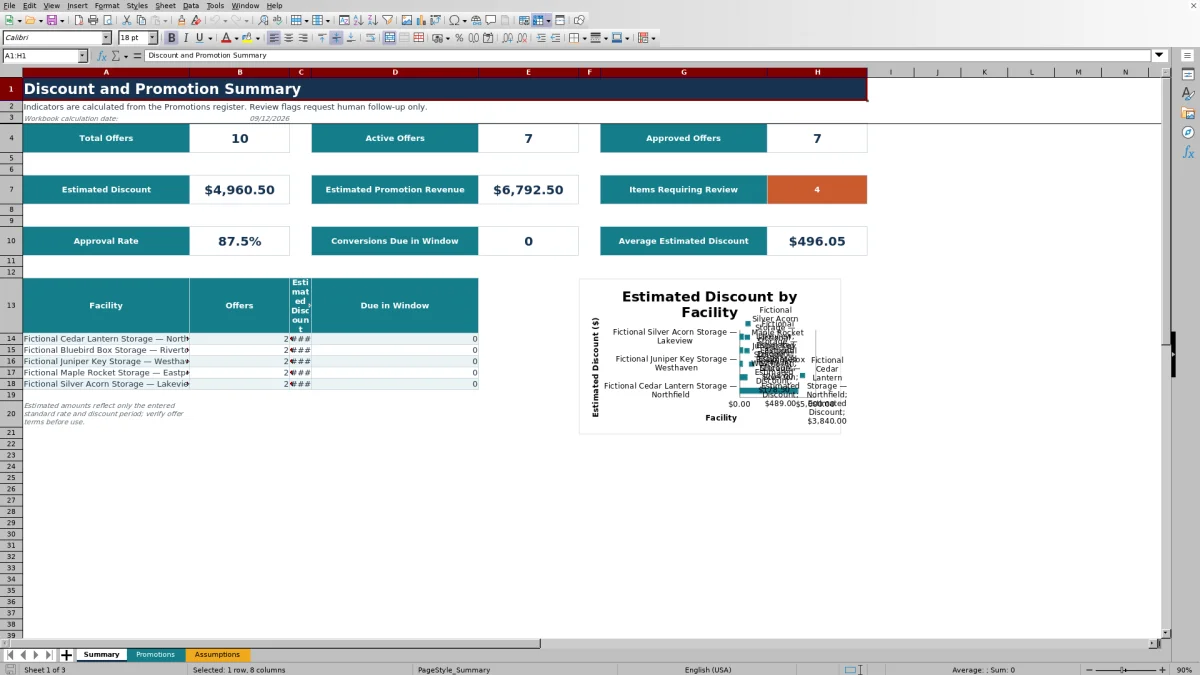
The Summary sheet reports total, active, and approved offers; estimated discounts; estimated promotion revenue; approval rate; average estimated discount; review-flag count; and conversions due within the window set on the Assumptions sheet.
A facility breakdown shows offer counts, estimated discounts, and conversions due for the listed facilities. The chart uses the facility names and estimated discount totals from that breakdown.
Managing promotions across facilities
The Assumptions sheet contains five editable facility options used by the Promotions dropdown and facility-level Summary formulas. Replace the fictional sample names with the locations the team needs to track while keeping each facility entry distinct.
Consistent facility names, offer IDs, discount methods, and statuses make the register easier to filter and help the Summary formulas group records correctly. Regional operators and acquisition teams can use the same structure when organizing comparable offer information from several locations.
Frequently asked questions
What does the Excel promotion tracker calculate?
It calculates the offer end date, full-rate conversion due date, estimated discount, estimated promotion revenue, and a formula-based review flag. The Summary sheet also calculates offer counts, approval rate, facility totals, and conversions due within the configured window.
Which discount methods does the workbook support?
The Promotions sheet supports Percentage, Fixed Monthly, and First Month Free methods. Percentage offers use the Discount % field, while Fixed Monthly offers use the Fixed Discount per Month field.
How many promotion records can the register hold?
The prepared Promotions register contains 200 entry rows, covering rows 5 through 204. Its formulas, validation, formatting, and filter are configured for that range.
How is the full-rate conversion due date determined?
The offer end date is calculated by advancing the offer start by the entered discount period and subtracting one day. The full-rate conversion due date is the following day.
Can the workbook send reminders or change tenant rates automatically?
No. The workbook displays dates, metrics, and review flags, but it does not send notices, change rates, post charges, or update another property management system.
About the editors

Casey MonroeFacility operations editor

Elliot ParkFinance and performance editor